
Module 05 · The req board
GHL pipeline designs that make every hiring stage readable
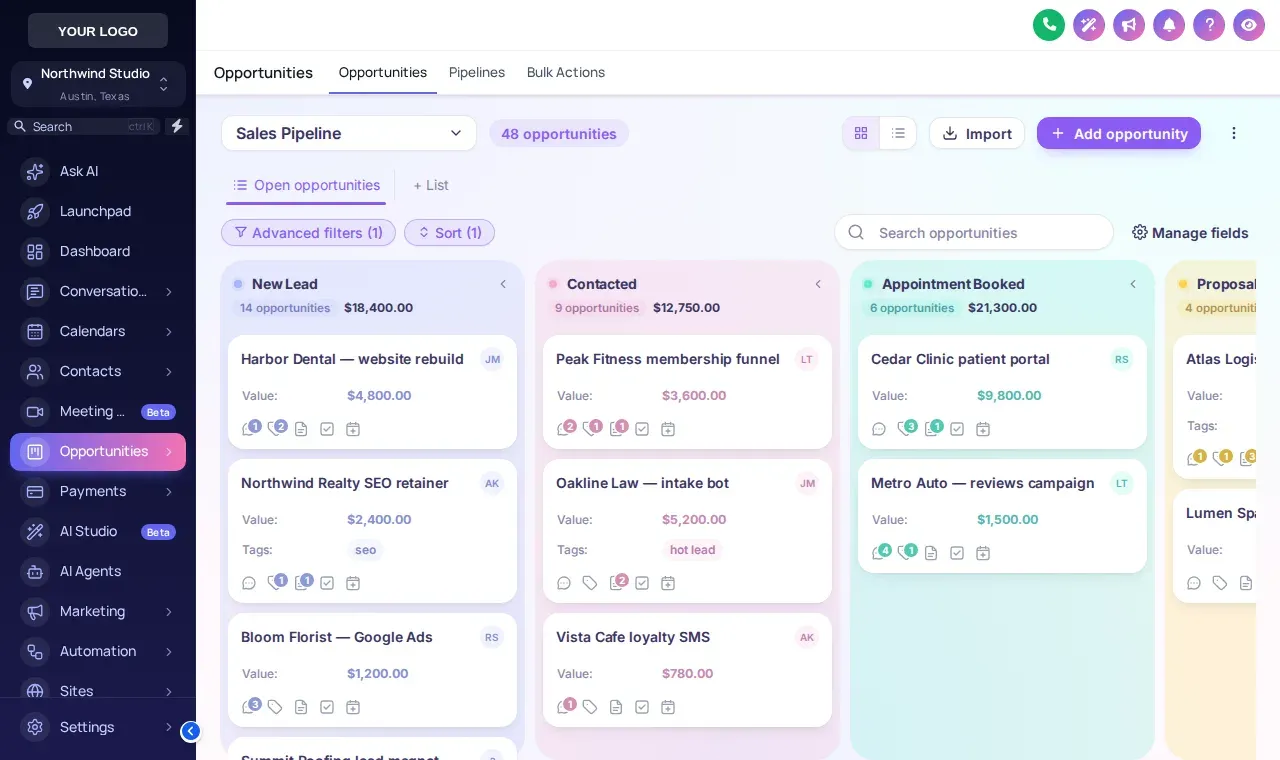
Give the GoHighLevel opportunities board one of 12 designs and each stage gets its own color. A recruiter scanning forty candidates can see who is Submitted and who is waiting on an interview without reading a single column header.
Applied
Forklift operatorLine leadScreened
RN, nightsSubmitted
ControllerInterview
Data analystPlaced
CNC machinistWhy do stage colors matter on a recruiting pipeline?
Color lets a recruiter read the board by shape instead of by text. On a stock GoHighLevel board every lane is the same grey, so finding the five candidates waiting on client feedback means reading every header.
Tinted lanes or colored headers fix that. It matters most on Monday pipeline reviews, on a shared screen with a client, and for new recruiters still learning your stages.
Try all 12 GoHighLevel pipeline designs
The board is a copy of the GoHighLevel opportunities page with a sample pipeline. Stage names differ from yours; the colors follow column order.
Try it live
Loading the live preview…
Candy Pastel A copy of the GoHighLevel opportunities board restyled by the real engine. Stage colors follow column position, so your own stages (Applied, Screened, Submitted, Placed) pick them up whatever they are called.
The 12 board designs
- Clean LightSoft grey lanes, white cards, colour dot per stage
- Frosted GlassColour-mesh board, see-through lanes and cards
- Midnight NeonDeep navy board, glowing stage lines, neon accents
- Neo BrutalThick outlines, hard shadows, loud stage colours
- Candy PastelEach lane softly tinted in its own pastel colour
- Gradient HeadersBold gradient stage headers above clean cards
- Compact ProDense and flat: more deals on screen at once
- Colour RibbonStage-coloured ribbons and lightly tinted cards
- Obsidian GoldBlack and gold, premium and calm
- Ocean ProCorporate blues, solid header bands
- Emerald CalmFresh greens, soft tinted lanes
- Brand MatchStage colours built from your primary colour
Pipelines staffing agencies run in GoHighLevel
Temp and contract fills
High volume, fast moves. Compact Pro fits more cards; color tells coordinators which shifts still need confirming.
Perm and executive search
Fewer candidates, longer stages. Frosted Glass or Obsidian Gold reads well on a shared screen with a client.
Client business development
Your sales pipeline for new job orders. Colour Ribbon separates prospect, meeting, proposal and signed at a glance.
How to restyle your GHL pipeline
Open the pipeline designer
Pick one of 12 board designs. Candy Pastel tints each lane; Gradient Headers keeps clean cards under bold stage headers.
Keep your own stages
Nothing to rename. Colors follow column position, so Applied, Screened, Submitted, Interview and Placed pick them up in order.
Preview with your theme
Check the board against your sidebar theme on desktop and phone.
Publish
Every pipeline in every sub-account uses the design on its next load.
Pipelines
GHL pipeline design FAQs
Can you customize the GoHighLevel pipeline view?
Yes. The pipeline designer restyles the GoHighLevel opportunities board: lane colors, stage headers, card style, spacing and density. There are 12 designs, and your pipelines, stages and opportunities do not change.
Do I have to rename my pipeline stages?
No. Colors are assigned by column position, so any pipeline picks them up whatever the stages are called: a temp desk, a perm search pipeline and a client BD pipeline all work.
Which pipeline designs are there?
Clean Light, Frosted Glass, Midnight Neon, Neo Brutal, Candy Pastel, Gradient Headers, Compact Pro, Colour Ribbon, Obsidian Gold, Ocean Pro, Emerald Calm, Brand Match.
Is there a compact design for big candidate pipelines?
Yes. Compact Pro fits more cards on screen for high-volume light-industrial or call-center pipelines with dozens of candidates per stage.
Which package includes pipeline designs?
The pipeline designer starts at Interview Ready ($487 one-time).
Does it change drag and drop or automations?
No. Dragging an opportunity between stages works exactly as before, and any workflow triggered by a stage change still fires in GoHighLevel.
Can each pipeline have a different design?
The design applies to the opportunities board for the workspace you publish. Stage colors still differ by column, which is what makes stages easy to tell apart.
Will it work with the Hiring Snapshot pipelines?
Yes. The snapshot installs recruiting pipelines; the designer styles whatever pipelines are in the account, including those.
Keep building the brand
See every stage at a glance
12 pipeline designs come with Interview Ready, alongside dashboards, mega menus and the contact actions bar.
Login emailed within minutes (max 24 hours) · One-time payment, lifetime access · Packages from $197
Independent product. GoHighLevel and HighLevel are trademarks of HighLevel Inc. Hiring Snapshot is an independent affiliate and is not an official partner, employee or reseller of HighLevel. The customizer runs on the GHL Customer Care platform and changes only how your own GoHighLevel account looks and behaves in the browser; your data stays in GoHighLevel. Screens on this page are live previews and screenshots of the real customizer engine applied to sample data.