
Module 03 · Wayfinding
GoHighLevel menu customization for desks that move fast
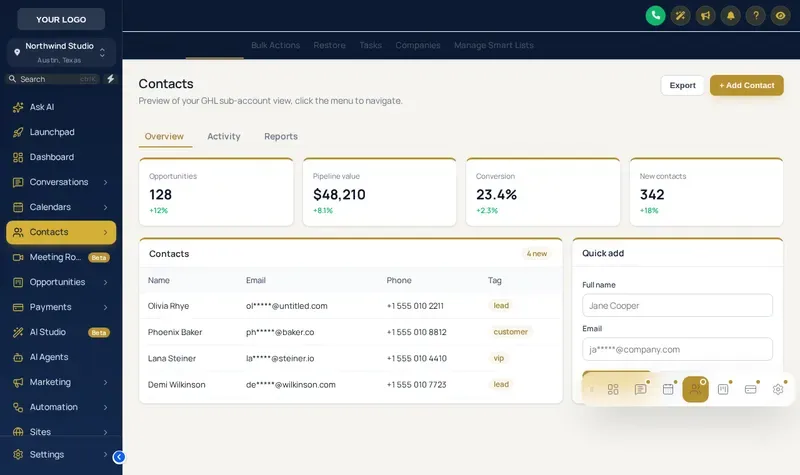
Put the GHL sidebar on the left, the right or across the top, open sections as mega menus, and float a quick menu over every page. Recruiters reach candidates, interviews and job orders in fewer clicks, and the layout looks like your office signage.
Menu options in numbers
- 8
- Mega menu styles
- 8
- Top bar styles
- 8
- Header styles
- 8
- Quick menu skins
Which GHL menu layout suits your desk?
| Layout | Best for | Package |
|---|---|---|
| Left sidebar | Teams used to stock GoHighLevel; least retraining | Shortlist |
| Right sidebar | Recruiters who keep a calling app or ATS docked on the left of the screen | Shortlist |
| Top bar | Wide pipeline boards; more horizontal room for stage columns | Shortlist |
| Mega menus | Agencies with many sub-pages under Sites, Payments or Marketing | Interview Ready |
| Floating quick menu | Heavy users who jump between conversations, calendar and candidates all day | Interview Ready |
The floating quick menu
Shortcuts that follow recruiters onto every page. Bubble, dock or side rail, 8 skins, draggable.
Set up your navigation in four steps
Choose a layout
Left sidebar, right sidebar, top bar or a collapsed icon rail. Pick the one that leaves the most room for your pipeline.
Style the sub-menus
Keep plain lists or switch sections with sub-pages to one of 8 mega menu styles, then pick one of 8 header styles.
Add the floating quick menu
Put the pages recruiters jump to most (conversations, calendars, contacts, opportunities) in a bubble, dock or rail with 8 skins.
Publish
Preview it on desktop and phone, then publish. Your installed line picks it up on the next page load.
Menus
GHL menu and navigation FAQs
Can you change the GoHighLevel sidebar menu?
Yes. The customizer can move the GHL sidebar to the right, turn it into a top bar, collapse it to icons, restyle active items, and turn sections with sub-pages into mega menus. Menu items still point to the same GoHighLevel pages.
What is a GoHighLevel mega menu?
A mega menu opens a section's sub-pages as a wide panel (columns, tiles, tabs and more) instead of a long list. The customizer has 8 styles: Columns, Split, Cascade, Tiles, Tabs, Icon rail, Accordion, Wide.
Which package includes menu customization?
Sidebar or top-bar layout comes with Shortlist ($197). Mega menus and the floating quick menu start at Interview Ready ($487).
What is the floating quick menu?
A small launcher that floats over every GoHighLevel page with shortcuts to the pages you use most. It comes in 3 layouts (Bubble and grid, Dock bar, Side rail) and 8 skins, and can be dragged anywhere.
Will moving the menu confuse my recruiters?
The items and their order stay the same, so muscle memory carries over. Most teams pick a layout once, preview it with one recruiter, and publish it for everyone the same day.
Does the top bar work on small laptop screens?
Yes. There are 8 top bar styles including Slim and Segmented for narrower screens, and the preview has a phone view so you can check it before publishing.
Can I hide menu items recruiters never use?
Menu layout and styling are handled here; which features a user can open is still controlled by GoHighLevel roles and permissions, which you set in GoHighLevel as usual.
Does the menu work in client sub-accounts?
Yes. The layout applies to the agency view and to every sub-account under your white-label domain.
Keep building the brand
Shorter routes to every candidate
Mega menus and the floating quick menu come with Interview Ready, together with the dashboard, pipeline and contact action tools.
Login emailed within minutes (max 24 hours) · One-time payment, lifetime access · Packages from $197
Independent product. GoHighLevel and HighLevel are trademarks of HighLevel Inc. Hiring Snapshot is an independent affiliate and is not an official partner, employee or reseller of HighLevel. The customizer runs on the GHL Customer Care platform and changes only how your own GoHighLevel account looks and behaves in the browser; your data stays in GoHighLevel. Screens on this page are live previews and screenshots of the real customizer engine applied to sample data.