
Sample candidate
Forklift operator · 2nd shift
- Pay rate
- $21/hr
- Available
- Monday
Tags
No tags yet
Demo only. Tap a chip.
Module 06 · Dispositions
A GHL contact actions bar for one-tap candidate dispositions
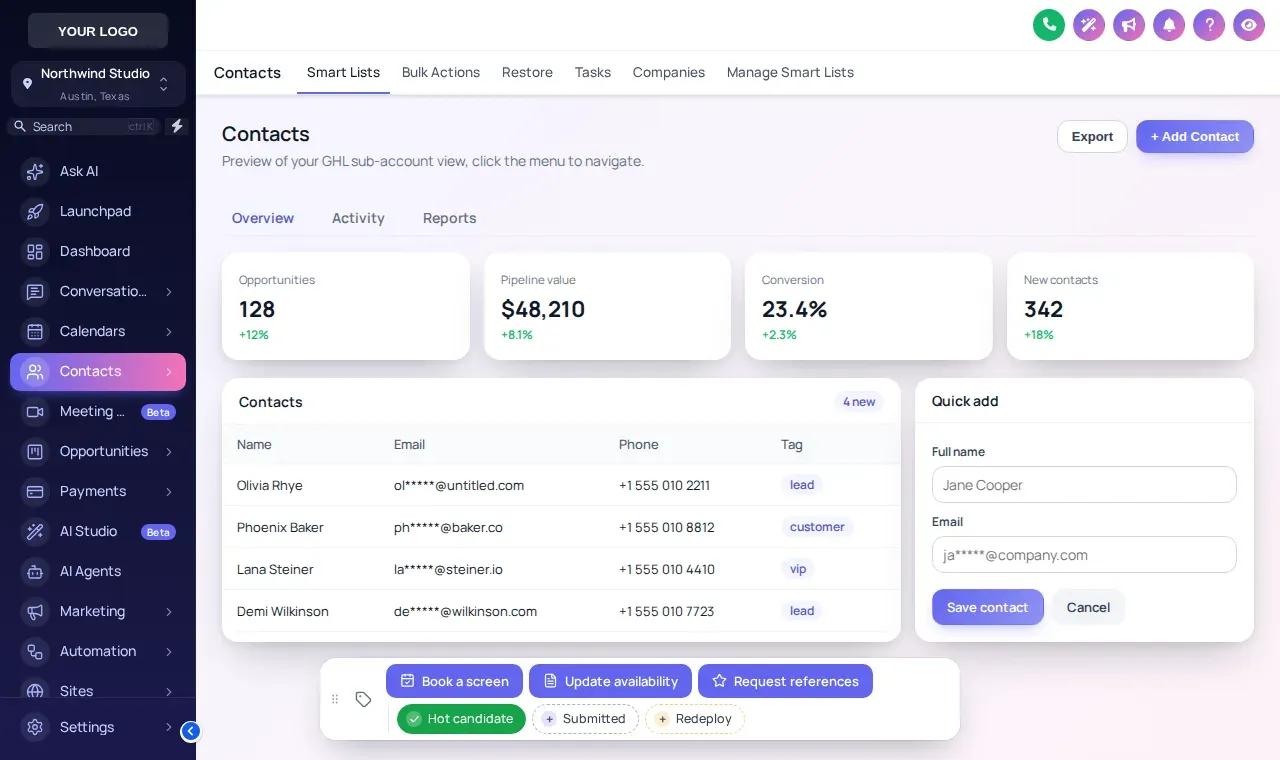
Put your most-used tags and quick forms on every GoHighLevel contact, one tap each. Mark a candidate Submitted, start the screening workflow, or log a new pay rate without leaving the record. Try the card beside this text.
How many clicks does tagging a candidate take?
In stock GoHighLevel, adding a tag takes four actions; with the contact actions bar it takes one. On a desk making 200 dispositions a week, that is roughly 600 fewer clicks per recruiter.
Stock GoHighLevel
- Open the tags field on the contact
- Type the start of the tag
- Pick it from the list
- Confirm and close
With the contact actions bar
- Tap the chip. The tag is on, and any workflow it triggers starts.
Click counts are for adding one existing tag; the weekly figure assumes 200 tag changes per recruiter.
Try the real contact actions bar
Loaded with recruiting tags and an Update availability form. Change chip colors, what it shows and where it sits.
Try it live
Loading the live preview…
Color per tag The real contact actions bar with recruiting tags. Tap a tag, open Update availability, or drag the bar. In the preview nothing is saved; inside GoHighLevel the record updates at once.
Tag and button recipes for staffing desks
Starting points; rename them to match your own workflow tags.
| Action | Type | Typical workflow |
|---|---|---|
| Hot candidate | Quick tag | Alert the account manager |
| Submitted | Quick tag | Start client follow-up reminders |
| Redeploy | Quick tag | Add to the redeployment nurture |
| Book a screen | Button (tag) | Text the scheduling link |
| Update availability | Button (form) | Saves pay rate, start date, shift |
| Request references | Button (tag) | Send the reference request email |
6 positions
- Bottom center
- Bottom left
- Bottom right
- Top center
- Top left
- Top right
Set up quick tags in GoHighLevel
Add your quick tags
List the tags recruiters set most, such as Hot candidate, Submitted and Redeploy, and give each a color or use your brand color.
Add action buttons
A button can add or remove tags (to start a workflow) or open a short form that saves straight into custom fields, such as pay rate, availability and shift.
Pick a position
Choose one of 6 positions on the contact page, or let recruiters drag it where they like.
Connect workflows in GoHighLevel
Use the tags as workflow triggers in GoHighLevel, for example "tag added: book screen" sends the scheduling link.
Contact actions
Contact actions bar FAQs
What is the contact actions bar?
It is a small toolbar the customizer adds to every GoHighLevel contact record. It holds quick tags you can toggle with one tap and buttons that add tags or open a short form that writes to custom fields.
How does it save time for recruiters?
Tagging a candidate in stock GoHighLevel means opening the tag field, typing, selecting and confirming. With the bar it is one tap, which adds up across hundreds of dispositions a week.
Can a button trigger a GoHighLevel workflow?
Yes, through tags. A button adds a tag such as "book screen"; a GoHighLevel workflow that starts on that tag can send the scheduling link, notify the account manager or move the opportunity.
What can the quick forms update?
Contact custom fields. For staffing that usually means pay rate, availability date, preferred shift, certifications or the last client submitted to.
Does it work on phones?
Yes. The bar has 6 positions and can be dragged, so it stays out of the way on smaller screens. The preview above has a phone view.
Which package includes contact actions?
The contact actions bar starts at Interview Ready ($487 one-time).
Is anything saved in the preview on this page?
No. The preview runs the real bar on sample data and saves nothing. Inside GoHighLevel the contact updates straight away.
Does it affect TCPA or consent handling?
No. The bar only adds tags and updates fields. Consent capture and opt-out rules stay in your GoHighLevel workflows, where the Hiring Snapshot configures them.
Keep building the brand
One tap per disposition, on every candidate
The contact actions bar is part of Interview Ready, with the dashboard and pipeline designers and mega menus.
Login emailed within minutes (max 24 hours) · One-time payment, lifetime access · Packages from $197
Independent product. GoHighLevel and HighLevel are trademarks of HighLevel Inc. Hiring Snapshot is an independent affiliate and is not an official partner, employee or reseller of HighLevel. The customizer runs on the GHL Customer Care platform and changes only how your own GoHighLevel account looks and behaves in the browser; your data stays in GoHighLevel. Screens on this page are live previews and screenshots of the real customizer engine applied to sample data.