· Marcus Delgado · Field Reports · 19 min read
TempWorks Pricing in 2026: What a Quote-Only Staffing Platform Actually Costs (and Who Should Skip It)
TempWorks publishes no price and routes every plan to a demo. Here's the reported 2026 cost by edition, the four fees nobody quotes you, three-year totals for a solo, 8-seat and 18-seat desk, and an honest read on who should buy it and who should walk.
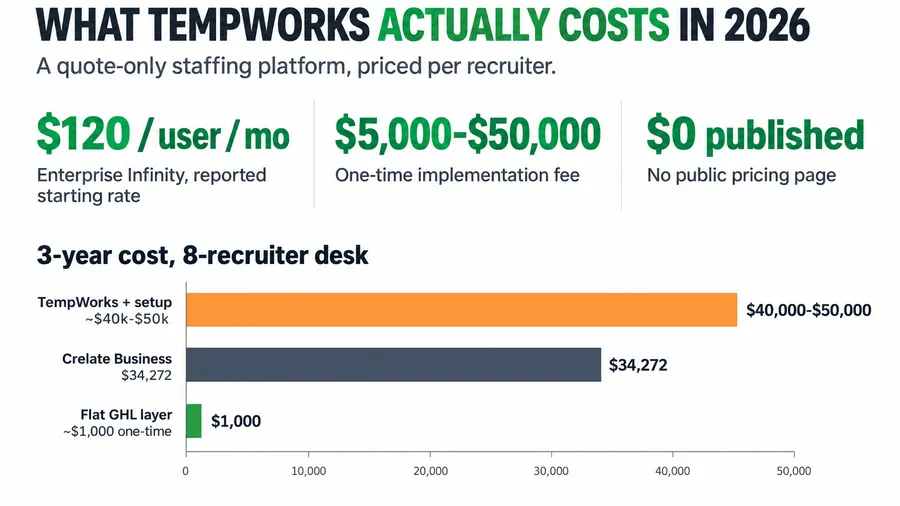
TempWorks does not publish a price. Based on third-party reporting in 2026, a light-industrial desk should budget roughly $120 per user per month for the Enterprise Infinity edition, a one-time implementation fee between $5,000 and $50,000 depending on size, and a first-year all-in cost that review trackers put between about $19,400 and $74,000 for a 10-user setup. The lighter Core product is reported far cheaper, near $49 per user per month for a one or two-person shop, but it does far less. There is no public pricing page, no instant quote, and no way to size the real number without a sales call. That is by design. This is the operator’s teardown of what TempWorks actually costs in 2026, the four fees that never make it into the demo, three-year totals for a solo operator, an 8-recruiter agency and an 18-recruiter shop, and the honest answer on who should buy it and who should walk away.
Key takeaways
- TempWorks is fully quote-only. G2 and Research.com both confirm the vendor publishes no pricing. Directory sites list a base “starting at $125 per month,” which is a floor, not your number.
- Reported per-user rate: the Enterprise Infinity edition is reported to start around $120 per user per month, roughly $1,200 to $2,000 per month for 10 users (ITQlick). The entry Core product is reported near $49 per user.
- Implementation is the real sticker shock: a reported $5,000 for a small agency to $50,000+ for an enterprise rollout, on top of the license (ITQlick).
- Watch the compliance-update fees. Reviewers report being charged a $50 support fee to get a state overtime-law update applied (Capterra). On a pay-and-bill platform, “the law changed” can become a line item.
- Per-seat pricing punishes growth. Every edition is priced per recruiter, so the bill climbs each time you hire. A flat-cost capture layer like the Hiring Snapshot is a one-time $997 build whose cost does not rise with headcount.
Table of contents
- It is Friday and payroll just broke
- Why TempWorks hides its price
- What you are actually buying
- The reported pricing, edition by edition
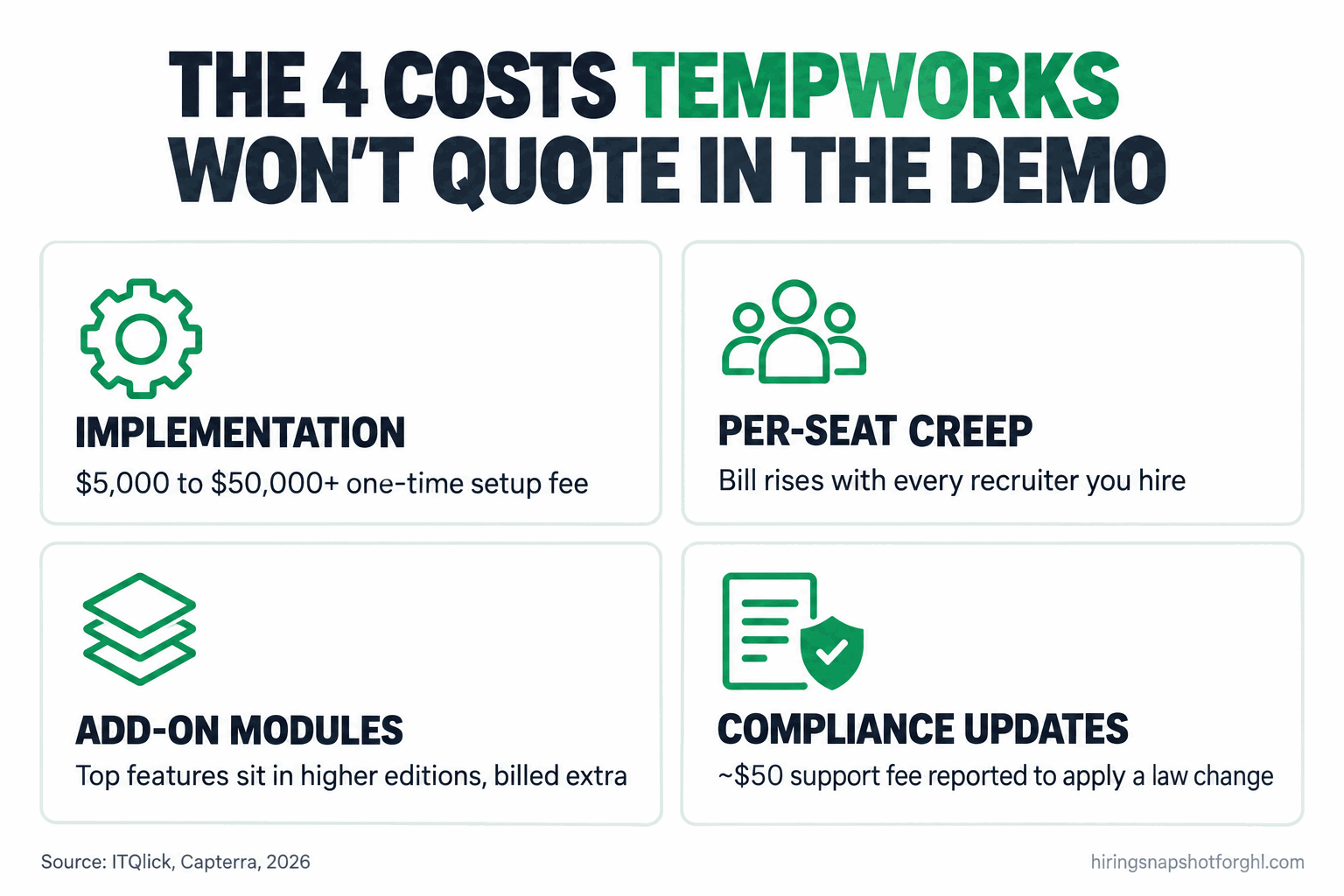
- The four costs no one quotes you
- Three-year cost for an 8-recruiter desk
- Three scenarios: solo, 8-seat, 18-seat
- How to run the TempWorks demo so you don’t overpay
- Who TempWorks is right for, and who should skip it
- The compliance cost buyers forget
- Common objections, answered
- FAQ
It is Friday and payroll just broke
It is 2:10pm on a Friday. You have 46 temps who worked this week, their hours are sitting in three places, and the payroll run has to be clean by 4 so everyone gets paid. One timecard is wrong, the client disputes four hours, and your one back-office person is on the phone with a software rep who wants to “schedule time next week” to fix it. That is the exact moment a light-industrial operator starts shopping for a real pay-and-bill platform, and TempWorks is usually the first name on the list.
Here is the short answer before the demo pitch gets to you. TempWorks is a capable, purpose-built staffing platform that runs the front office and the back office off the same captured hours. It is also quote-only, priced per seat, and front-loaded with an implementation fee that dwarfs the first few months of license. For a high-volume light-industrial desk that lives on weekly payroll, it can be worth every dollar. For a small or mixed desk, you can pay enterprise money for capability you will not use. The rest of this piece is the math so you can tell which one you are before a rep anchors you on a price.
Why TempWorks hides its price
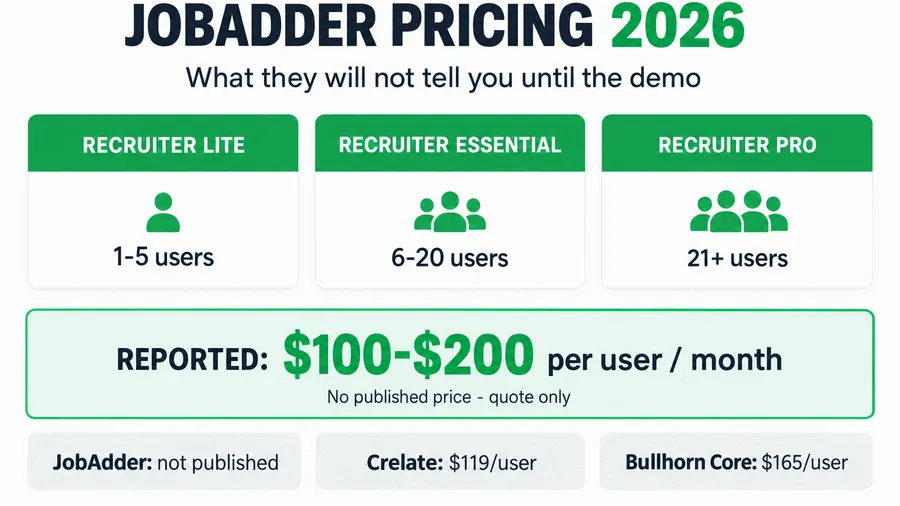
TempWorks publishes no pricing page. Its own G2 listing says the vendor has not provided pricing information and tells buyers to contact sales, and Research.com reports the same. The only public number is a “starting at $125 per month” base figure that directory sites like Capterra carry, and that is a floor for the smallest possible setup, not a quote for a working desk.
Quote-only is not a courtesy. It is a negotiating position. When a vendor hides the number, you cannot comparison-shop on price before a call, so you walk into a demo with no anchor. The rep scopes your seat count, your urgency, and how badly your current process is bleeding, and the quote comes back shaped to what they think you will pay. You beat that by knowing the reported numbers cold, the way you would know a client’s pay rate before you quote a bill rate. I broke down this pattern across the whole category in the 2026 staffing ATS pricing teardown; TempWorks sits at the expensive, back-office-heavy end of it.
What you are actually buying
TempWorks is not just an applicant tracker. That matters for the price, because you are comparing it against two different kinds of tool and only one comparison is fair.
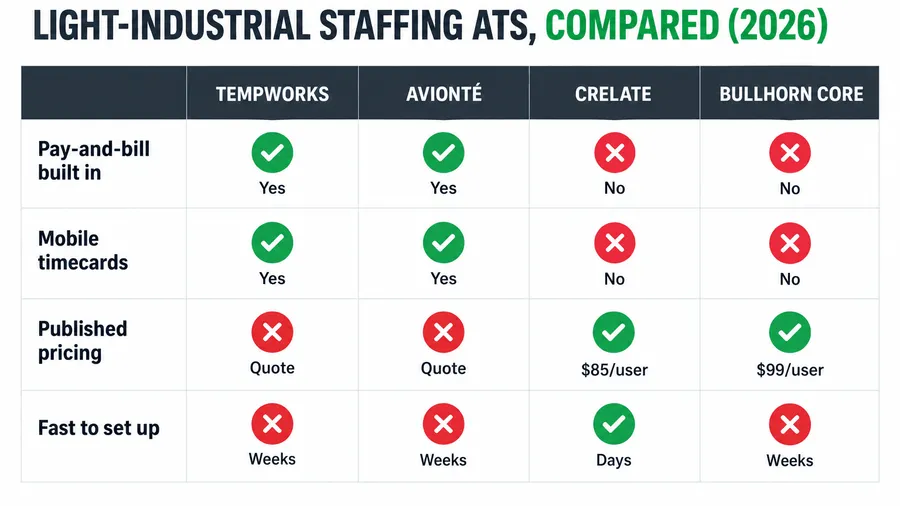
A front-office ATS like Crelate or Bullhorn Core tracks candidates, manages the pipeline, and stops at the offer. A true light-industrial platform treats the offer as the start of a weekly cycle: capture the hours, run payroll, invoice the client off the same hours, handle tax calculation, and do it again next Friday. TempWorks is the second kind. It runs pay-and-bill natively, which is exactly why a staffing desk with 46 temps on assignment reaches for it and why a perm search desk does not need it.
So the honest comparison is not “TempWorks versus a $119 ATS.” It is “TempWorks versus a $119 ATS plus a separate payroll and billing stack.” When you see TempWorks quoted higher, part of that gap is real back-office software a cheaper ATS simply does not include. The question is never just “how much,” it is “how much for the parts I will actually run.” If payroll does not flow through your software, you are overpaying for TempWorks. If it does, a cheaper front-office ATS is not actually cheaper once you add the payroll stack it is missing. I compared the light-industrial options head to head in the best ATS for light-industrial staffing under 20 seats.
The reported pricing, edition by edition
Every figure below is third-party-reported, because TempWorks publishes nothing. Treat them as ranges to walk in with, then get an itemized quote for your seat count and modules.
Core: the entry product
TempWorks Core is the lighter edition aimed at small shops. It is reported around $49 per user per month with no long-term contract, which is the cheapest entry point into the TempWorks world. The catch is scope. Core is built for a one to two-person operation and does not carry the full enterprise back office, so a growing light-industrial desk tends to outgrow it and get steered toward Enterprise or Infinity, where the real money is. Treat the $49 as a reported starting figure, not the number you will land on once you need the modules that make the platform worth buying.
Enterprise and Infinity: the real product
This is what most light-industrial desks actually buy. ITQlick reports Enterprise Infinity starting around $120 per user per month, with a single-user license starting near $150 per month and a 10-user setup landing between $1,200 and $2,000 per month once the edition and modules are scoped. Scale that up and a 100-user operation is reported at $10,000 to $18,000 per month. On top of the license sits a module and tier structure, where a mid-tier adds a few hundred dollars a month and the top enterprise configuration can add $1,000 or more per month over the base.
The base “starting at $125”
The “$125 per month” you see on directory sites is the smallest-possible base, and it is the number a rep will quote fast because it sounds friendly. It is almost never what a working desk pays, because it predates seat count, implementation, and the modules that make the platform do pay-and-bill. Use it as proof the floor exists, not as your budget.
Here is the reported picture next to the transparent anchors in the category, so you can see where TempWorks sits.
| What you pay | TempWorks (Enterprise Infinity) | Crelate Business | Bullhorn Core |
|---|---|---|---|
| Published price | None (quote-only) | $119 per user (Pin) | $165 per user (ATLAS) |
| Reported per-user rate | ~$120 per user (ITQlick) | $119 (Essentials $85, up to 2 users) | $99 Starter / $165 Core |
| Pay-and-bill built in | Yes | No | No (Bullhorn One only) |
| Implementation fee | $5,000 to $50,000+ | $3,000 to $35,000 (reported) | $5,000 to $45,000 (reported) |
| Pricing transparency | None | High | Medium |
The four costs no one quotes you
The per-seat figure is the part they say out loud. These four are the part you feel later, and on a pay-and-bill platform they bite harder than on a plain ATS.
- Implementation and onboarding. This is the big one. ITQlick reports implementation, customization, training and data migration running $5,000 for a small agency to $50,000 or more for an enterprise, as a one-time fee on top of the license. G2 data puts average time-to-implement around two months. That is two months of paying before the system runs your first clean payroll.
- Per-seat creep. Every edition is priced per user per month. That is fine at two recruiters and painful at fifteen, because your software bill is now tied directly to headcount and gets more expensive precisely when you are trying to widen margin per requisition. The line only ever goes up when you hire.
- Add-on modules and tiers. The capability that makes TempWorks worth buying, the full back office, advanced reporting, worker apps, lives in higher editions and paid modules, not the base. ITQlick’s own breakdown shows a mid-tier adding a few hundred a month and the enterprise tier adding $1,000+ a month over the base. The demo shows you the loaded version; the quote often starts at the base.
- Compliance-update and support fees. This is the one that surprises people. Capterra reviewers report being charged a $50 support fee to get a state overtime-law update applied, and others describe paying to stay compliant when a law changed. On a platform that runs payroll, “the rules changed” can quietly become a billable event. Ask exactly how law-change updates are priced before you sign.
Keep those four in view for every quote. A friendly $120 per seat can become a far larger effective cost in year one once implementation and modules land. Here is how that stacks up for a real desk.
Three-year cost for an 8-recruiter desk
Take an 8-recruiter light-industrial desk and run the reported numbers over three years, license only, before you add a single extra module. At the reported Enterprise Infinity rate of about $120 per seat, eight seats run roughly $960 a month, or about $34,560 over three years in license alone, and that is before the one-time implementation fee of $5,000 to $15,000 that a desk this size typically sees. Set that next to Crelate Business at $119 per seat (front-office only, no payroll) and a flat-cost capture layer that does not charge per seat at all.
Two caveats keep this honest. The TempWorks figure buys a payroll and billing engine Crelate does not include, so a straight sticker comparison understates what the front-office tools really cost once you bolt on a payroll stack. And the flat build is a capture-and-nurture layer, not an ATS or a payroll system, so a pay-and-bill shop runs it in front of TempWorks, not instead of it. The narrow, real point stands: anything priced per seat gets more expensive every time you hire, and the implementation fee is money gone before the first clean payroll runs.
Three scenarios: solo, 8-seat, 18-seat
The right answer on TempWorks changes completely with your size, because the implementation fee and the per-seat model land differently on each.
The solo operator or two-person shop. You are placing a mix of temp and perm, payroll is light, and you probably do not run a true weekly pay-and-bill cycle yet. TempWorks Core at a reported $49 per user is the only edition that makes sense here, and even then you are buying a back office you may not fully use. The reported base of $125 a month plus any implementation is real money for a one-person desk. At this size, a transparent front-office ATS plus a payroll partner, or a flat-cost capture layer in front of a lightweight tracker, usually beats paying for enterprise plumbing you will not run for another year.
The 8-recruiter agency. This is the fairest case for TempWorks. You have enough temps on assignment that weekly payroll and client billing through one system saves real back-office hours, and the per-seat math (about $960 a month license plus a mid-size implementation) is defensible against the labor it replaces. The watch-out is the implementation fee and the two-month ramp. Budget the $5,000 to $15,000 one-time cost as a capital expense, not a surprise, and hold the rep to a go-live date in the contract.
The 18-recruiter shop. At this size per-seat creep is the whole story. Eighteen seats at a reported $120 is roughly $2,160 a month, about $25,900 a year in license before modules, and every new recruiter adds another $120 a month on top. TempWorks’ native pay-and-bill is probably worth it at this volume, but this is exactly where you negotiate hardest on the per-seat rate and the escalator, and where moving the lead-capture layer off per-seat pricing frees the most margin. The payroll engine should scale with you; the candidate-capture layer should not cost you more every time you grow.
How to run the TempWorks demo so you don’t overpay
Because there is no public price, the demo is the negotiation. Walk in with these questions written down and make the rep put the answers in writing. Steal this list verbatim.
The seat and edition questions
- “What is the exact per-user, per-month rate for the edition you are quoting, at my seat count, billed annually?”
- “Which edition is this quote for, Core, Enterprise, or Infinity, and what is in the next edition up that is not in this one?”
- “If I add a recruiter mid-contract, what does seat 9 cost, and is it prorated?”
The implementation questions
- “What is the one-time implementation and data-migration fee, as a single number, and what is included?”
- “What is the contracted go-live date, and what happens to the fee if you miss it?”
- “Is training included in that fee or billed separately per session?”
The fee-trap questions
- “How are state and federal law-change updates priced? Are payroll-compliance updates included or billed as support?”
- “What is your support model, and is there a per-ticket or per-call charge?”
- “What is the annual price escalator at renewal, as a percentage, in writing?”
The exit question
- “If I leave in year two, what does a full data export cost, and in what format do I get my candidate and payroll records?”
Get those answered before anyone talks about “getting you started today.” A rep who will not put the implementation fee and the escalator in writing is telling you something. For the per-seat negotiation specifically, the same playbook that defends your bill rate against a client works on a software rep: know your floor, anchor first, and make them justify the premium. I laid that out in defending your markup against rate pushback.
Who TempWorks is right for, and who should skip it
Buy TempWorks if you run a true light-industrial or high-volume desk where revenue flows through a weekly pay cycle, you have the seat volume (roughly 6 to 50 recruiters) to justify native pay-and-bill, and you want the staffing-industry incumbent with deep payroll, tax, and billing built in. At that profile the implementation fee amortizes fast against the back-office hours it saves.
Skip it, or at least get a second quote, if you are a solo or two-person shop, if you place mostly perm where there is no weekly payroll to run, or if you are mixed and already pay for a payroll provider you are happy with. In those cases you can pay enterprise money for a back office you barely touch. A perm-leaning desk is almost always better served by a transparent front-office ATS, and a growing desk is better served by keeping the candidate-capture layer on flat pricing so it does not tax every hire. If you are weighing the staffing platform against building on GoHighLevel, I compared the trade-offs in GoHighLevel vs Bullhorn for staffing agencies.
The compliance cost buyers forget
Pay-and-bill software touches payroll, which means it touches compliance, and compliance is where quiet costs live. Two matter most for a 2026 buyer.
First, the law-change fee pattern above is not theoretical. When a state changes overtime or pay rules, your platform has to reflect it or your payroll is wrong, and at least some TempWorks customers report being charged to get that update applied (Capterra). Price that risk in. Second, any platform that automates screening or scheduling now runs into AI-in-hiring law. New rules on automated employment decision tools and fair-hiring disclosure are live, and the cost of getting them wrong lands on the agency, not the vendor. The platform is a tool; the liability is yours. I covered the current rules for staffing desks in AI hiring laws for staffing agencies in 2026. Whatever you buy, confirm in writing who is responsible when a regulation changes.
Common objections, answered
“Isn’t TempWorks the industry standard? Why would I look elsewhere?” It is a standard for a reason, and for a high-volume pay-and-bill desk it earns the spot. But “standard” and “right for your size” are different claims. The incumbent is priced and built for established staffing operations, and a small or perm-leaning desk can pay for that heritage without using it. Being the default does not make it the cheapest fit for your model.
“The demo made it look like everything is included. Is it?” The demo shows the loaded, top-edition version. The quote frequently starts at a lower edition, with the modules you just watched sitting in a higher tier or as paid add-ons. That is the single most common gap between what buyers think they are getting and what the contract says. Match every feature you liked in the demo to a line in the written quote.
“We already pay for a payroll provider. Does TempWorks still make sense?” Maybe not. The core reason to pay TempWorks’ premium is native pay-and-bill off captured hours. If you already run payroll cleanly through a provider you trust, you are paying for the most expensive part of TempWorks twice. In that case a transparent front-office ATS that integrates with your payroll stack is usually the better spend.
“I just want fewer candidates to slip away. Do I need all this?” No. If your actual problem is speed-to-lead, applicants going cold before a recruiter calls, no-shows, slow follow-up, that is a capture-and-nurture problem, not a payroll problem. A flat-cost automation layer fixes it for a fraction of a pay-and-bill platform and sits in front of whatever ATS you already run. Buy the back office when you need the back office; fix the front door separately.
FAQ
How much does TempWorks cost per user in 2026?
TempWorks publishes no pricing, so every figure is third-party-reported. The Enterprise Infinity edition is reported to start around $120 per user per month, with a 10-user setup landing roughly $1,200 to $2,000 per month (ITQlick). The lighter Core product is reported near $49 per user for a one or two-person shop, and directory sites list a base “starting at $125 per month” that is a floor, not a working-desk quote. Get an itemized quote for your seat count before you sign.
Does TempWorks charge an implementation fee?
Yes, and it is the biggest surprise in the budget. Implementation, customization, data migration and training are reported as a one-time fee of roughly $5,000 for a small agency up to $50,000 or more for an enterprise rollout, separate from the monthly license (ITQlick). Average time-to-implement is reported around two months, so you pay before the system runs your first payroll.
Why won’t TempWorks show pricing online?
Because quote-only pricing is a negotiating position. With no public number you cannot comparison-shop before a sales call, so the rep scopes your seat count and urgency and shapes the quote to what they think you will pay. Both G2 and Research.com confirm the vendor publishes nothing. Knowing the reported ranges before the call is how you keep the anchor on your side.
Is TempWorks worth it for a small staffing agency?
Often not, unless you run a true weekly pay-and-bill cycle. For a solo or two-person desk, or a perm-leaning shop, you can pay enterprise money for a back office you barely use. TempWorks earns its premium on high-volume light-industrial desks of roughly 6 to 50 recruiters where native payroll and billing save real hours. Below that, a transparent front-office ATS plus a payroll partner usually costs less.
What are the hidden fees with TempWorks?
Four main ones: the one-time implementation fee ($5,000 to $50,000+), per-seat creep as you add recruiters, add-on modules and higher editions for the features shown in the demo, and support or compliance-update charges. Reviewers report being billed a $50 support fee to apply a state overtime-law update (Capterra), so confirm how law changes are priced before you commit.
How does TempWorks pricing compare to Bullhorn and Crelate?
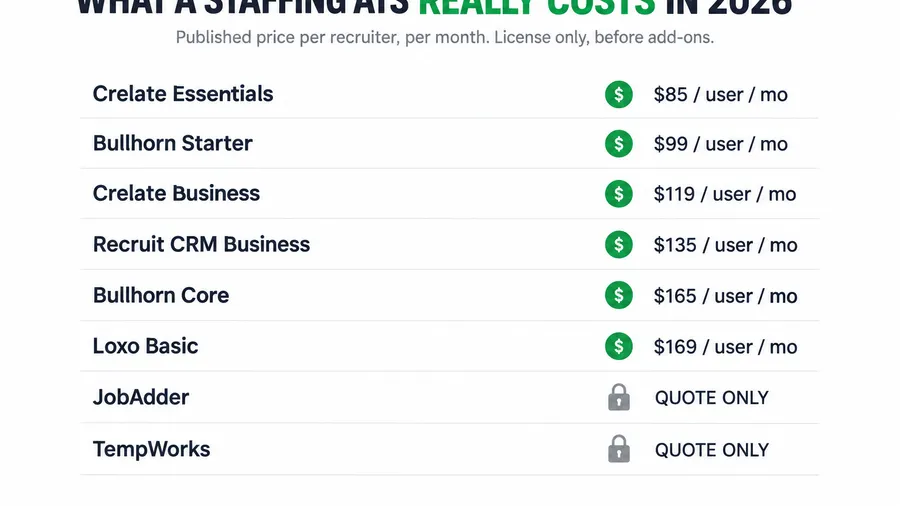
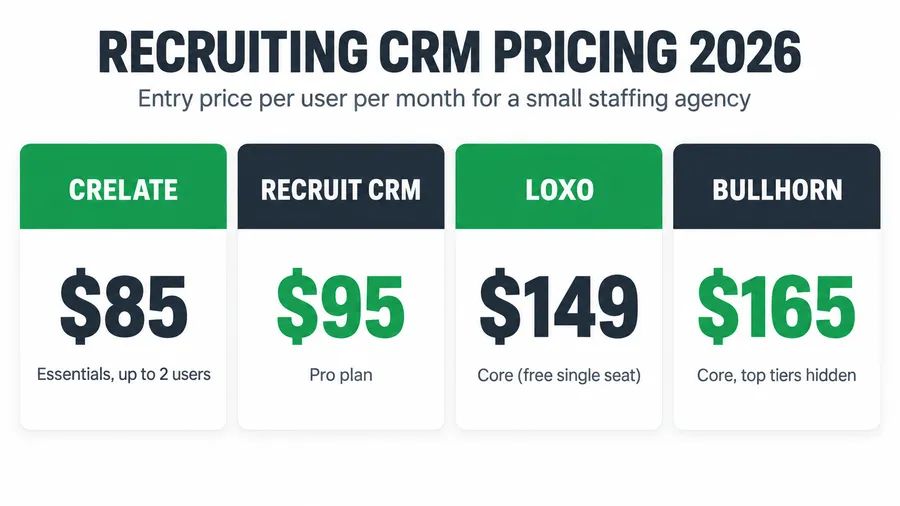
Crelate is the transparent anchor at a published $119 per user for Business (Pin), and Bullhorn Core is published at $165 per user (ATLAS). TempWorks is reported near $120 per user but adds native pay-and-bill the other two do not include in those tiers, plus a heavier implementation fee. The fair comparison is TempWorks against a front-office ATS plus a separate payroll stack, not against the ATS license alone. See the full 2026 staffing ATS pricing teardown.
About the author
Marcus Delgado is the Staffing Agency Growth Lead behind the Hiring Snapshot. He ran a light-industrial staffing desk before joining the team to focus on agency growth, and he thinks in placement economics: fill rates, redeploys, and gross margin per requisition. His posts lean on real desk math, not vanity metrics.
Related reading
- Staffing ATS Pricing in 2026: What Bullhorn, Crelate, Loxo and JobAdder Really Cost
- The Best ATS for Light-Industrial Staffing Under 20 Seats (2026)
- Bullhorn Alternatives for Small Staffing Agencies: 6 Options and What They Really Cost
- GoHighLevel vs Bullhorn for Staffing Agencies: An Honest Comparison
- Contractor Redeployment: The Automation That Turns One Placement Into Three
Buy the back office when your payroll runs through your software, not before. See how the Hiring Snapshot works, then get the full build for a one-time $997, installed within one business day and flat no matter how many recruiters use it.