· Marcus Delgado · Field Reports · 20 min read
JobAdder Pricing in 2026: What They Won't Tell You Until You Book the Demo
JobAdder publishes no price and gates every plan behind a demo. Here's the reported 2026 cost by tier, the four fees nobody quotes you, three-year totals for a solo, 8-seat and 25-seat desk, and an honest read on who should buy it and who should walk.
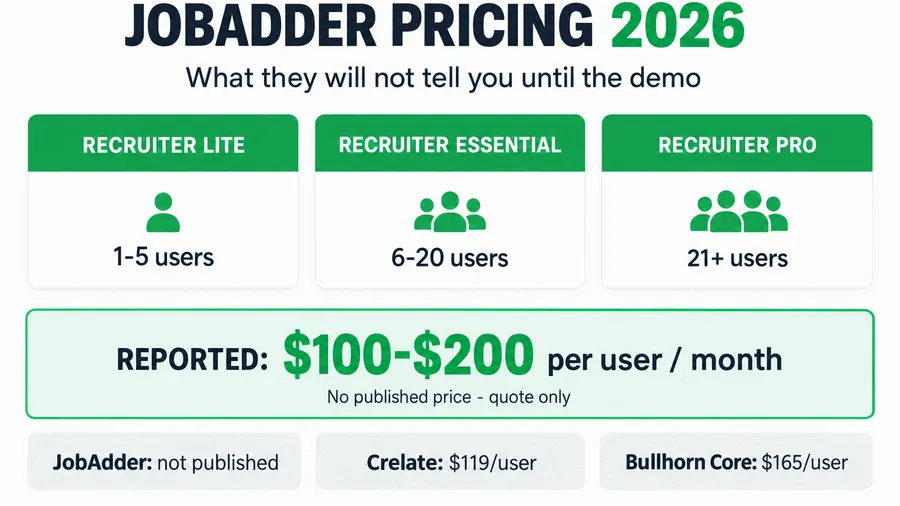
JobAdder does not publish a price. Based on third-party reporting in 2026, a recruiting desk should budget roughly $100 to $200 per user per month for the license alone, an implementation fee reported between $2,000 and $10,000 for a ten-user team, and a tier you are slotted into by headcount rather than by what you actually need. There is no public pricing page, no instant quote, and no trial. Every plan routes to a “book a demo” form, and the number comes back shaped to your seat count and how badly your current process is bleeding. This is the operator’s teardown of what JobAdder really costs in 2026, the four fees that never make it into the demo, three-year totals for a solo operator, an 8-recruiter agency and a 25-recruiter shop, and the honest answer on who should buy it and who should walk away.
Key takeaways
- JobAdder is fully quote-only. G2 reports the vendor has not provided pricing information, and Capterra lists the starting price as “Contact vendor.” Its own pricing page routes all four plans to a request form.
- Reported per-user rate: third-party trackers put JobAdder somewhere around $100 to $200 per user per month (ITQlick, Compono). One 2024 European quote cited €124 per user per month for the Essential plan (HeroHunt).
- You are tiered by size, not need. JobAdder’s plans split on headcount: Recruiter Lite for 1 to 5 users, Essential for 6 to 20, and Pro for 21 or more (ATLAS). The API lives on Pro, is an add-on on Essential, and is not available on Lite.
- Implementation is a separate line item, reported at $2,000 to $10,000 for a ten-user team, with an average time-to-implement around two months (ITQlick, G2).
- Per-seat pricing punishes growth. Every tier is priced per recruiter, so the bill climbs each time you hire. A flat-cost capture layer like the Hiring Snapshot is a one-time $997 build whose cost does not rise with headcount.
Table of contents
- It is Monday and three applicants already went cold
- Why JobAdder hides its price
- What you are actually buying
- The reported pricing, tier by tier
- The four costs no one quotes you
- Three-year cost for an 8-recruiter desk
- Three scenarios: solo, 8-seat, 25-seat
- How to run the JobAdder demo so you don’t overpay
- Who JobAdder is right for, and who should skip it
- The compliance cost buyers forget
- Common objections, answered
- FAQ
It is Monday and three applicants already went cold
It is 8:50am on a Monday. Over the weekend four people applied to your warehouse req, three of them from a job board you pay for, and not one has heard back. By the time your recruiter opens the ATS at nine and starts calling, two have already accepted somewhere faster and the third does not pick up. That lost hour is the exact pain that sends an operator shopping for a better recruiting platform, and JobAdder, clean, well reviewed, and built for agencies, is usually on the shortlist.
Here is the short answer before a sales rep anchors you. JobAdder is a capable, well-liked recruiting CRM and ATS that agencies rate highly on Capterra, a 4.4 out of 5 across 161 reviews. It is also quote-only, priced per seat, tiered by your headcount, and front-loaded with an implementation fee the demo rarely mentions. For a growing agency that lives in its ATS all day, it can be worth the spend. For a small or mixed desk, you can pay for seats and modules you barely touch. The rest of this piece is the math so you can tell which one you are before the demo gets to you.
Why JobAdder hides its price
JobAdder publishes no pricing page with dollar figures. Its G2 listing states the vendor has not provided pricing information, and Capterra shows “Contact vendor” where a starting price would go. There is no free trial listed, so the only path to a number runs through a demo and a sales call.
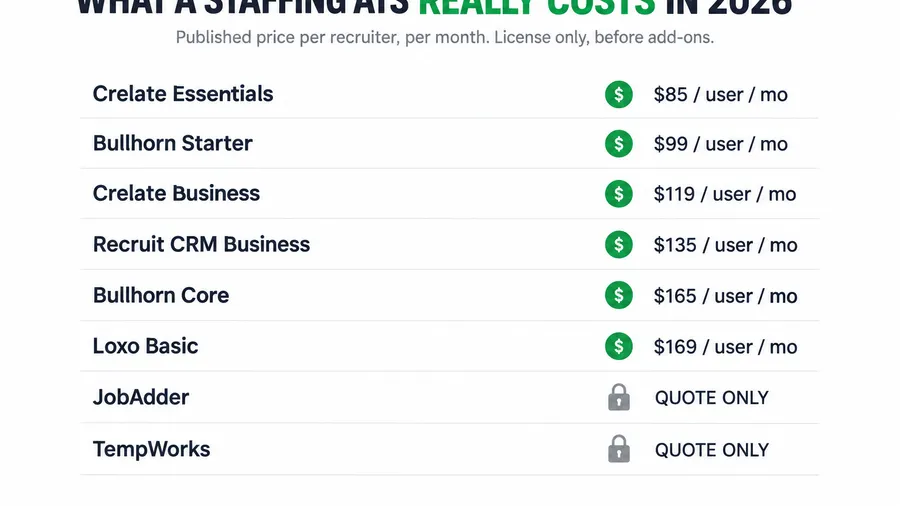
Quote-only is not a courtesy. It is a negotiating position. When a vendor hides the number, you cannot comparison-shop on price before a call, so you walk in with no anchor. The rep scopes your seat count, your urgency, and how much your current process is costing you, then the quote comes back shaped to what they think you will pay. You beat that the same way you beat a client who will not name a budget: you know the reported numbers cold before you sit down. I broke the whole category down in the 2026 staffing ATS pricing teardown; JobAdder sits in the mid-market, cheaper than Bullhorn’s loaded tiers but opaque in exactly the same way.
What you are actually buying
JobAdder is a front-office recruiting platform: an applicant tracking system and a recruitment CRM in one, with job-board posting, candidate management, a pipeline, and a large integration marketplace. That matters for the price, because it tells you what JobAdder is not. It is not a pay-and-bill engine. It does not run your weekly payroll or invoice clients off captured hours the way a light-industrial platform like TempWorks does. So the fair comparison is JobAdder against other front-office tools, Crelate, Loxo, Recruit CRM, Bullhorn’s lower tiers, not against a full back office.
The platform sells on breadth and polish. Connections across more than 200 job boards come included, though each board owner still bills you for the posting itself, so a “paid” board like Reed or CV-Library is a cost on top. The integration marketplace is genuinely deep, and agencies that rate JobAdder highly tend to be the ones using that breadth every day. The question is never just “how much.” It is “how much for the parts I will actually run.” If your desk uses the pipeline, the board posting, and three or four integrations daily, the seat price buys real work. If you bought it to stop losing applicants over the weekend, you are paying ATS money to fix a speed-to-lead problem a much cheaper layer solves.
The reported pricing, tier by tier
Every figure below is third-party-reported, because JobAdder publishes nothing. Treat them as ranges to walk in with, then get an itemized quote for your exact seat count and add-ons. The one thing JobAdder is clear about is the tier structure, and it is unusual: you are placed by how many recruiters you have, not by which features you want.
Recruiter Lite: 1 to 5 users
Lite is the entry plan, aimed at new and boutique agencies with a stated maximum of five users (ATLAS). It is the cheapest way into JobAdder, but the ceiling is the catch. The API and sandbox are not available on Lite at all, so if you ever want to connect JobAdder to your website, a custom form, or another tool, you cannot do it on this plan. You will be quoted a per-seat rate inside the reported $100 to $200 band, and the moment you hire a sixth recruiter you are moved up a tier, not just charged for one more seat.
Recruiter Essential: 6 to 20 users
Essential is the growing-agency plan and where most small-to-mid desks land. The API is available here, but as a paid add-on rather than included (ATLAS). This is the tier that carries the broadest range of real-world quotes: a 2024 European buyer reported €124 per user per month for Essential on a 12-month contract billed monthly, plus a €550 upfront implementation fee (HeroHunt). That number is dated and European, so treat it as a data point, not your quote, but it lines up with the $100 to $200 band the US trackers report.
Recruiter Pro: 21 or more users
Pro is the established-agency plan, and it is where the contract terms tighten. Compono reports that JobAdder requires annual contracts for Recruiter Pro, where Lite and Essential may be billed monthly. The upside is that the API and sandbox are free on Pro. The reported per-seat rate sits at the top of the band, so this is the tier where per-seat creep does the most damage and where you negotiate hardest.
Recruiter Business
There is a fourth plan, Recruiter Business, aimed at in-house talent teams rather than agencies, with a bespoke build. If you are an agency, this is not your plan, but it is worth knowing it exists so a rep cannot present a corporate configuration as your only option.
Here is the reported picture next to the transparent anchors in the category, so you can see where JobAdder sits.
| What you pay | JobAdder (Essential) | Crelate Business | Bullhorn Core |
|---|---|---|---|
| Published price | None (quote-only) | $119 per user (Pin) | $165 per user (ATLAS) |
| Reported per-user rate | ~$100 to $200 per user (ITQlick) | $119 (Essentials $85, up to 2 users) | $99 Starter / $165 Core |
| Tiered by | Headcount (1-5, 6-20, 21+) | Feature edition | Feature edition |
| API access | Add-on on Essential, free on Pro | Included | Included |
| Implementation fee | $2,000 to $10,000 (10 users, reported) | $3,000 to $35,000 (reported) | $5,000 to $45,000 (reported) |
| Pricing transparency | None | High | Medium |
The four costs no one quotes you
The per-seat figure is the part they say out loud. These four are the part you feel later.
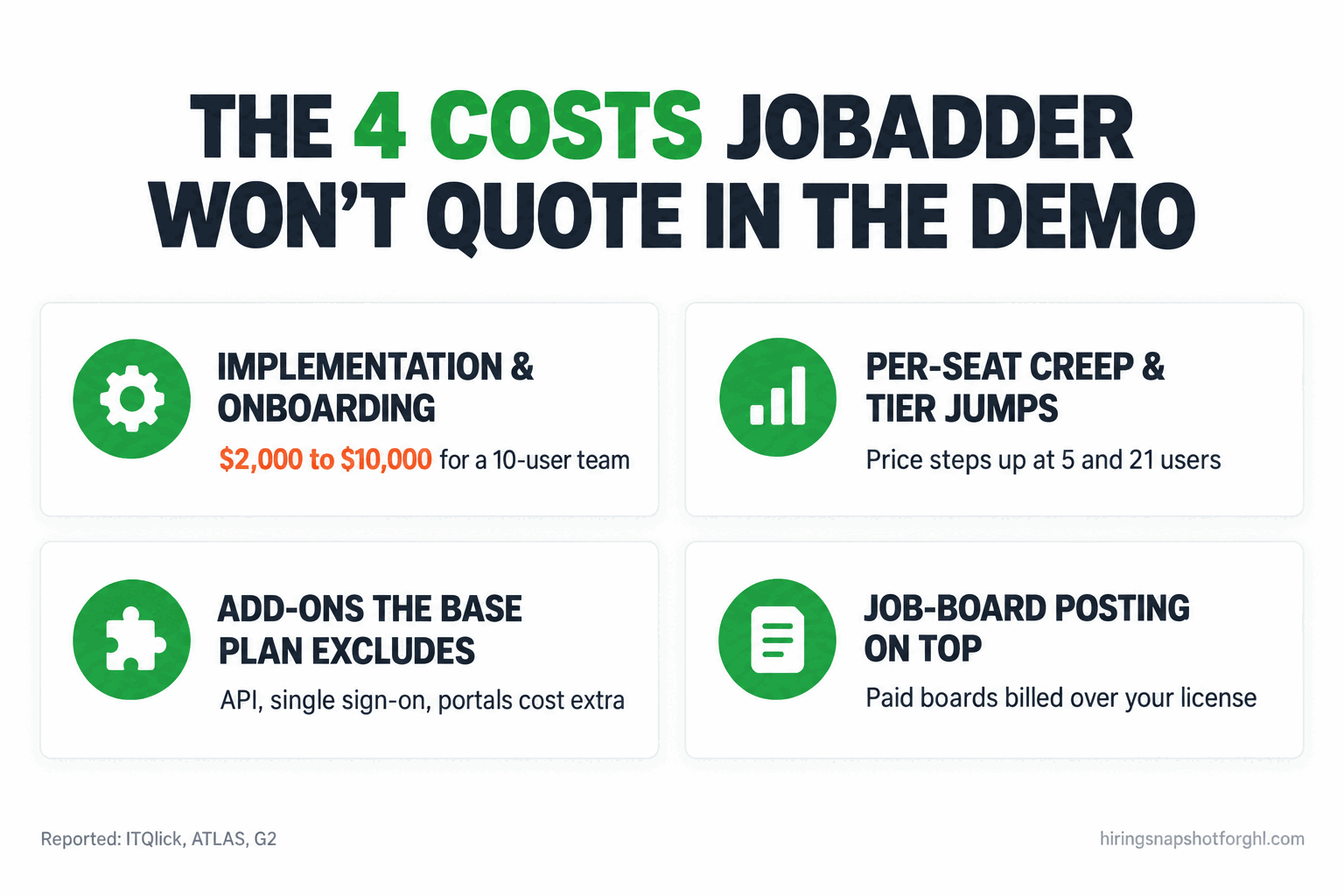
- Implementation and onboarding. ITQlick reconstructs implementation at $2,000 to $10,000 for a ten-user team, as a one-time fee on top of the license. G2 data puts the average time-to-implement around two months, and Giig reports that complex migrations can run up to ten weeks. That is up to ten weeks of paying for software before your recruiters are fully live on it.
- Per-seat creep, and tier jumps. Every plan is priced per user per month, so your bill is tied directly to headcount. JobAdder’s twist is that you also cross a tier boundary as you grow: hire past five and you leave Lite, hire past twenty and you hit Pro and its annual-contract requirement. The line does not just go up with each seat, it steps up at the boundaries, and it does so precisely when you are trying to widen margin per requisition.
- Add-ons the base plan excludes. The API and sandbox are an add-on on Essential and unavailable on Lite (ATLAS). Single sign-on, a hiring-manager portal, smart forms, and a dedicated IP address are all listed as add-ons with no published price. The demo shows you the connected, loaded version; the quote often starts below it.
- Job-board posting on top. The 200-plus board connections are included, but the boards themselves bill you. Paid boards like Reed, CV-Library and Totaljobs are a separate spend layered on your license, so your true monthly cost is the seat price plus whatever you post.
Keep those four in view for every quote. A friendly $130 per seat can become a much larger effective cost once implementation, the API add-on, and board spend land. Here is how that stacks up.
Three-year cost for an 8-recruiter desk
Take an 8-recruiter agency on the Essential tier and run the reported numbers over three years, license only, before you add the API or post a single paid job. At a mid-band $130 per seat, eight seats run about $1,040 a month, or roughly $37,440 over three years in license alone, and that is before the one-time implementation fee of $2,000 to $10,000 a desk this size typically sees. Set that next to Crelate Business at a published $119 per seat and a flat-cost capture layer that does not charge per seat at all.
One caveat keeps this honest. The flat build is a capture-and-nurture layer, not a full ATS, so an agency that genuinely lives in its applicant tracker all day runs the layer in front of a tracker, not instead of one. The narrow, real point stands: anything priced per seat gets more expensive every time you hire, and the implementation fee is money gone before your recruiters are fully live.
Three scenarios: solo, 8-seat, 25-seat
The right answer on JobAdder changes completely with your size, because the tier model and the per-seat math land differently on each.
The solo operator or two-person shop. You are on Recruiter Lite, somewhere in the $100 to $200 per seat band, which is $3,600 to $7,200 over three years for one seat, plus whatever implementation you are charged. The problem at this size is not the monthly, it is the ceiling: Lite has no API, so you cannot wire JobAdder to your website or a custom form, which is exactly the automation a solo desk needs most to stop doing everything by hand. At one or two seats, a transparent front-office ATS, or a flat-cost capture layer in front of a lightweight tracker, usually beats paying for a platform whose best wiring is locked behind a higher tier.
The 8-recruiter agency. This is the fairest case for JobAdder. You are on Essential, you have enough recruiters in the system all day that the pipeline, board posting, and integrations earn their keep, and the per-seat math (about $1,040 a month at a mid-band rate) is defensible against the recruiter hours it saves. The watch-outs are the implementation fee and the API add-on. Budget the $2,000 to $10,000 one-time cost as a capital expense, not a surprise, and get the API priced in writing if you plan to integrate, because it is not included at this tier.
The 25-recruiter shop. At this size you are on Pro, the API is free, and per-seat creep is the whole story. Twenty-five seats at a reported $160 is roughly $4,000 a month, about $48,000 a year in license before add-ons, and every new recruiter adds another seat on top. Pro also requires an annual contract, so this is exactly where you negotiate hardest on the per-seat rate and the renewal escalator, and where moving the lead-capture layer off per-seat pricing frees the most margin. The tracker should scale with you; the candidate-capture layer should not cost you more every time you grow.
How to run the JobAdder demo so you don’t overpay
Because there is no public price, the demo is the negotiation. Walk in with these questions written down and make the rep put the answers in writing. Steal this list verbatim.
The seat and tier questions
- “What is the exact per-user, per-month rate for my seat count, billed annually, and which tier does that put me in?”
- “What happens to my rate and my tier if I hire past the next boundary, past 5 users, or past 20?”
- “If I add a recruiter mid-contract, what does the next seat cost, and is it prorated?”
The implementation questions
- “What is the one-time implementation and data-migration fee, as a single number, and what is included?”
- “What is the expected go-live timeline, and what happens if it slips past two months?”
- “Is training included in that fee or billed separately?”
The add-on questions
- “Is API and sandbox access included on the tier you are quoting, or is it a paid add-on? What does it cost?”
- “Which of single sign-on, the hiring-manager portal, smart forms, and a dedicated IP are extra, and at what price?”
- “Which job boards in my market are paid, and roughly what will posting cost me per month on top of the license?”
The contract and exit questions
- “Is this plan month-to-month or an annual contract, and what is the renewal price increase, in writing?”
- “If I leave in year two, what does a full data export cost, and in what format do I get my candidate records?”
Get those answered before anyone talks about “getting you started this week.” A rep who will not put the implementation fee, the tier boundaries, and the renewal escalator in writing is telling you something. For the per-seat negotiation specifically, the same playbook that defends your bill rate against a client works on a software rep: know your floor, anchor first, and make them justify the premium. I laid that out in defending your markup against rate pushback.
Who JobAdder is right for, and who should skip it
Buy JobAdder if you run a front-office recruiting desk, perm or mixed, where recruiters live in the ATS all day, you have the seat volume (roughly 6 to 50 recruiters) to use the pipeline and integrations fully, and you want a well-rated platform with a deep marketplace and broad board coverage. At that profile the seat price and the implementation fee amortize against the recruiter time the tool saves, which is why agencies rate it 4.4 on Capterra.
Skip it, or at least get a second quote, if you are a solo or two-person shop where Lite’s missing API blocks the automation you need, if you run a true light-industrial pay-and-bill cycle where JobAdder’s lack of native payroll means you still need a separate back office (I compared those tools in the best ATS for light-industrial staffing under 20 seats), or if your real problem is speed-to-lead rather than tracking. If you are weighing JobAdder against other front-office options, the Bullhorn alternatives rundown puts the transparent-priced tools side by side, and GoHighLevel vs Bullhorn for staffing agencies covers the build-versus-buy trade-off.
The compliance cost buyers forget
Any platform that automates screening, scheduling, or candidate decisions now runs into AI-in-hiring law, and the cost of getting it wrong lands on the agency, not the vendor. JobAdder markets AI features for sourcing and screening, and the moment you switch those on you are using what some jurisdictions now define as an automated employment decision tool. New York City’s Local Law 144 requires a bias audit of those tools within a year of use, a public summary of the results, and notice to candidates. Colorado’s SB 24-205 adds a risk-management program and impact assessments, with requirements scheduled to take effect in 2026. The platform is a tool; the liability is yours. I covered the current rules for staffing desks in AI hiring laws for staffing agencies in 2026. Whatever you buy, confirm in writing what the vendor documents about its AI features, because you will need that documentation if a regulator asks.
Common objections, answered
“JobAdder gets great reviews. Why not just buy it?” The reviews are real, and for the right desk they are earned. But a 4.4 rating tells you current customers are happy, not that the tool is the right price or fit for your size and model. The agencies that love JobAdder tend to be the ones using its full breadth daily. If you would use a fraction of it, you are paying for a platform rated for people who use all of it.
“The demo made it look like everything is included. Is it?” The demo shows the connected, loaded version: API wired in, boards posting, portals live. The quote frequently starts at a tier that excludes some of that, with the API as an add-on on Essential and unavailable on Lite. Match every feature you liked in the demo to a line in the written quote before you sign.
“We already pay for Bullhorn. Should we switch?” Maybe, if Bullhorn’s loaded tiers are costing you more than you use and JobAdder’s mid-market seat price is a real saving. But a migration has its own cost, up to ten weeks and a four-figure implementation fee, so the switch only pays off if the ongoing saving clears that within a year. Price the migration, not just the new license.
“I just want fewer applicants to slip away. Do I need all this?” No. If your actual problem is speed-to-lead, applicants going cold before a recruiter calls, no-shows, slow follow-up, that is a capture-and-nurture problem, not a tracking problem. A flat-cost automation layer fixes it for a fraction of an ATS license and sits in front of whatever platform you already run. Buy the full ATS when you need the full ATS; fix the front door separately.
FAQ
How much does JobAdder cost per user in 2026?
JobAdder publishes no pricing, so every figure is third-party-reported. Trackers put it at roughly $100 to $200 per user per month (ITQlick, Compono), and a 2024 European quote cited €124 per user per month for the Essential plan (HeroHunt). Your actual rate depends on seat count and the tier it places you in, so get an itemized quote before you sign.
Does JobAdder charge an implementation fee?
Yes, and it is separate from the license. Implementation and data migration are reported at roughly $2,000 to $10,000 for a ten-user team (ITQlick), with an average time-to-implement around two months (G2) and complex migrations running up to ten weeks (Giig). No fee is published, so confirm the number in writing.
What are JobAdder’s pricing tiers?
JobAdder tiers by headcount, not by feature set: Recruiter Lite for 1 to 5 users, Recruiter Essential for 6 to 20, and Recruiter Pro for 21 or more, plus a Recruiter Business plan for in-house teams (ATLAS). API and sandbox access is unavailable on Lite, an add-on on Essential, and free on Pro, so the plan you are placed in affects what you can integrate.
Why won’t JobAdder show pricing online?
Because quote-only pricing is a negotiating position. With no public number you cannot comparison-shop before a sales call, so the rep scopes your seat count and urgency and shapes the quote. G2 confirms the vendor publishes nothing and Capterra lists “Contact vendor.” Knowing the reported ranges before the call keeps the anchor on your side.
Is JobAdder worth it for a small staffing agency?
For a 6-to-20-seat front-office desk that uses the pipeline and integrations daily, often yes. For a solo or two-person shop it is harder to justify, because Recruiter Lite excludes the API that a small desk needs to automate, and you can pay for breadth you will not use. A transparent front-office ATS, or a flat-cost capture layer in front of a lightweight tracker, usually costs less at that size.
Does JobAdder run payroll like TempWorks?
No. JobAdder is a front-office ATS and recruitment CRM, not a pay-and-bill platform. It does not run weekly payroll or invoice clients off captured hours, so a light-industrial desk that needs native pay-and-bill still has to add a separate back office. See the TempWorks pricing teardown for how the pay-and-bill platforms compare.
About the author
Marcus Delgado is the Staffing Agency Growth Lead behind the Hiring Snapshot. He ran a light-industrial staffing desk before joining the team to focus on agency growth, and he thinks in placement economics: fill rates, redeploys, and gross margin per requisition. His posts lean on real desk math, not vanity metrics.
Related reading
- Staffing ATS Pricing in 2026: What Bullhorn, Crelate, Loxo and JobAdder Really Cost
- Bullhorn Alternatives for Small Staffing Agencies: 6 Options and What They Really Cost
- The Best ATS for Light-Industrial Staffing Under 20 Seats (2026)
- TempWorks Pricing in 2026: What a Quote-Only Staffing Platform Actually Costs
- GoHighLevel vs Bullhorn for Staffing Agencies: An Honest Comparison
Buy the full ATS when your recruiters live in it all day, not before. See how the Hiring Snapshot works, then get the full build for a one-time $997, installed within one business day and flat no matter how many recruiters use it.