· Marcus Delgado · Field Reports · 21 min read
Loxo vs Crelate vs Recruit CRM vs Bullhorn: The 2026 Cost Breakdown for Small Staffing Agencies
Three of these four recruiting CRMs now publish a real price. One still hides most of its tiers. Here is what Loxo, Crelate, Recruit CRM and Bullhorn actually cost per seat in 2026, the metered and hidden fees that change the math, three-year totals for a solo, 8-seat and 25-seat desk, and an honest read on who each one is right for.
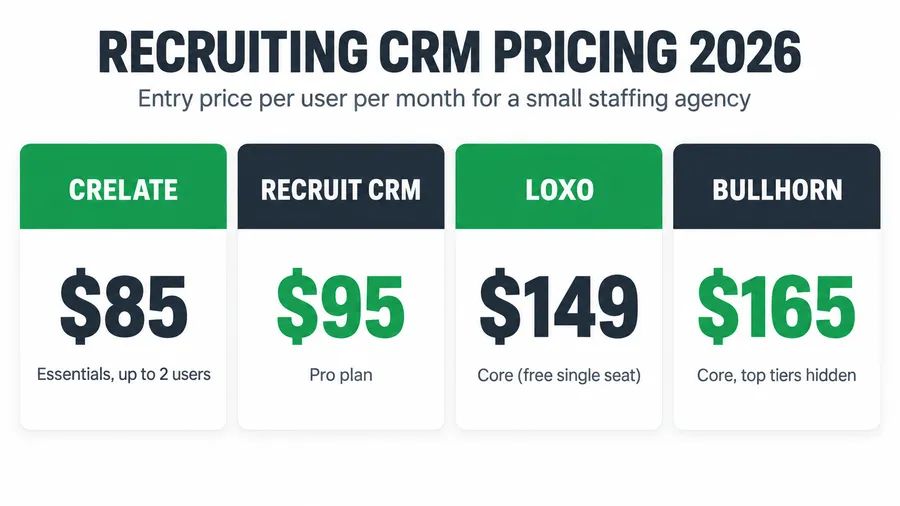
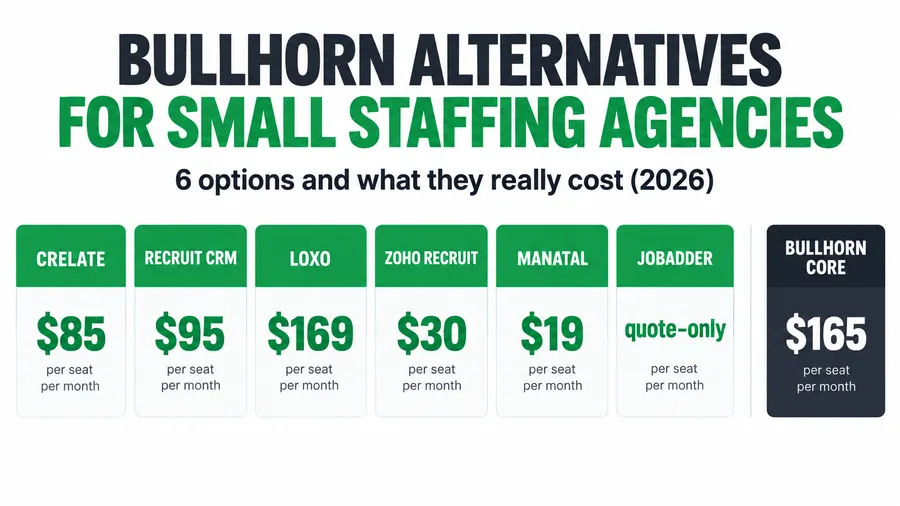
For a small staffing desk in 2026, the published entry price lands like this: Crelate from $85 per user per month (capped at two users) or $119 on Business, Recruit CRM from $95 on Pro, Loxo from $149 on Core, and Bullhorn from $99 on Starter or $165 on Core. Crelate, Loxo and Recruit CRM all show real numbers on their pricing pages now. Bullhorn publishes two tiers and gates the rest behind a demo. The sticker price is the easy part. What actually sets these four apart on cost is the stuff below the headline: how many contact credits you burn, what the migration costs, whether the price climbs every renewal, and how fast the per-seat bill grows when you hire. This is the operator’s breakdown of all four, with real figures pulled from each vendor’s own pricing page, three-year totals for three desk sizes, and a straight answer on who each tool actually fits.
Key takeaways
- Cheapest honest entry for a 1-2 person shop: Crelate Essentials at $85 per user per month, billed annually, capped at two users (Crelate). Loxo also has a genuine $0 single-seat plan for solo recruiters.
- Cheapest uncapped growing-team price: Recruit CRM Pro at $95 per user per month, with Business at $135 and Enterprise at $215 (Recruit CRM).
- Mid-market published rates: Crelate Business $119, Loxo Core $149, Bullhorn Core $165 per user per month (Crelate, Loxo, reported for Bullhorn).
- The hidden cost is metered usage. Loxo Core and Professional, and Recruit CRM’s tiers, meter AI sourcing and contact data by credits. Burn through the monthly allowance and you pay for more. Crelate charges separately for contact-data enrichment and e-signature.
- Per-seat pricing punishes growth. Every tier here is priced per recruiter, so the bill climbs each time you hire. A flat-cost capture layer like the Hiring Snapshot is a one-time $997 build that does not rise with headcount and sits in front of whichever CRM you pick.
Table of contents
- It is Thursday and you are paying for seats you do not fill
- What the wrong CRM costs a small desk
- The four tools at a glance
- Criterion 1: Published price and transparency
- Criterion 2: The per-seat bill as you grow
- Criterion 3: What the entry tier actually includes
- Criterion 4: Contact credits and the metered trap
- Criterion 5: Implementation and migration
- Criterion 6: Contracts, escalators and getting your data out
- Criterion 7: Fit for the staffing model you run
- Criterion 8: Support and the learning curve
- Three-year cost for an 8-recruiter desk
- Three scenarios: solo, 8-seat, 25-seat
- How to run the demos so you do not overpay
- The compliance cost none of them quote you
- Common objections, answered
- FAQ
It is Thursday and you are paying for seats you do not fill
It is Thursday afternoon. You have four recruiter seats on your CRM, but one of them belongs to a coordinator who logs in twice a week, and another to a desk you have not refilled since the last person quit. You are paying full freight on both. Meanwhile the one feature you bought the whole platform for, the AI sourcing, just told you that you are out of credits for the month. This is the quiet way a recruiting CRM gets expensive. Not the sticker price, the drift around it.
Here is the short answer before any sales rep anchors you. The four names a small staffing or recruiting shop shortlists most often are Loxo, Crelate, Recruit CRM and Bullhorn, and three of them now print a real price. Crelate is the cheapest way in at one or two seats, Recruit CRM is the cheapest uncapped price for a growing team, Loxo leans hardest into AI sourcing and gives solo recruiters a free seat, and Bullhorn is the heavyweight incumbent that costs the most and hides the most. None of them is wrong. They are priced for different desks. The rest of this piece is the math so you can tell which desk is yours before you sit through four demos.
What the wrong CRM costs a small desk
Staffing is a big, crowded market. The American Staffing Association counts roughly 27,000 staffing and recruiting companies in the US running about 54,000 offices (a 2021 figure), and those firms put nearly 2.2 million temporary and contract workers on assignment in an average week in 2024. Most of those companies are small, competing against thousands of other desks for the same candidates and clients, and the CRM you run the desk on is one of your largest fixed costs after payroll.
Get it wrong and you feel it two ways. You overpay: a five-seat team on a $165 per-user plan pays $9,900 a year before a single add-on, often for seats that barely get used. And the tool may not fix the problem you bought it for. Most small agencies do not have a candidate-tracking problem, they have a speed problem: applicants go cold over the weekend, nobody replies for six hours, the good ones accept somewhere faster. A fancier CRM does not solve that on its own. Price the tool against the job you actually need done, not the demo you are shown.
The four tools at a glance
Here is the published picture, pulled from each vendor’s own pricing page in 2026 where a number exists. Every figure is per user per month unless noted.
| Loxo | Crelate | Recruit CRM | Bullhorn | |
|---|---|---|---|---|
| Entry (published) | Free single seat; Core $149 | Essentials $85 (max 2 users) | Pro $95 | Starter $99 |
| Growing-team tier | Core $149 | Business $119 | Business $135 | Core $165 |
| Top tier | Professional / Enterprise (quote) | Business Plus / Platform (quote) | Enterprise $215 | Pro / Enterprise (quote) |
| Billing | Annual | Annual (Business also monthly) | Monthly or annual | Not stated (reported annual) |
| Metered credits | Yes, AI sourcing and data | Add-on enrichment | Yes, per tier | Add-on automation |
| Transparency | High | High | High | Medium |
Sources: Loxo, Crelate, Recruit CRM, and reported figures for Bullhorn. I covered the whole category in the 2026 staffing ATS pricing teardown. What follows is the eight things that actually decide the cost.
Criterion 1: Published price and transparency
This one changed in 2026, and it matters. Crelate, Loxo and Recruit CRM now all show real per-seat numbers on their pricing pages. For years recruiting software hid behind “book a demo,” because a hidden price is a negotiating position: you cannot comparison-shop before the call, so you walk in with no anchor and the quote comes back shaped to what the rep thinks you will pay.
Crelate shows Essentials at $85 and Business at $119. Loxo publishes Core at $149. Recruit CRM publishes Pro at $95, Business at $135 and Enterprise at $215, the most complete public ladder of the four. Bullhorn is the holdout: it publishes Starter at $99 and Core at $165, then routes Pro and Enterprise to a demo (100Hires). When a vendor will not show you the top of the ladder, assume that is where they make their money, and get every number in writing before you sign.
Criterion 2: The per-seat bill as you grow
Every tool here is priced per recruiter per month. That is the single most important fact about the cost, because your software bill grows at exactly the moment you are trying to widen margin per requisition. Hire a recruiter, add a seat. The line only goes up. Run it forward on the published growing-team tiers for one year, license only:
- Crelate Business ($119): one seat $1,428, five seats $7,140, ten seats $14,280.
- Recruit CRM Business ($135): one seat $1,620, five seats $8,100, ten seats $16,200.
- Loxo Core ($149): one seat $1,788, five seats $8,940, ten seats $17,880.
- Bullhorn Core ($165): one seat $1,980, five seats $9,900, ten seats $19,800.
The gap between the cheapest and the priciest of these is real money. Ten seats on Bullhorn Core runs $5,520 a year more than ten on Crelate Business, before anyone adds a credit pack or an automation module. That spread is the whole reason a small desk should price all four, not just renew whatever it started on.
Criterion 3: What the entry tier actually includes
A cheap entry tier is only cheap if it does the job. The catch is always what the entry plan leaves out.
Crelate Essentials is genuinely limited: capped at two users and 20,000 contacts, a solo or two-person plan by design, not a starter you grow on. Cross two users and you are on Business at $119. Loxo’s free single seat is a real product with ATS, CRM and Loxo Boost sourcing, not a time-boxed trial, which makes it the best true free option here for a one-person desk. Recruit CRM Pro at $95 is a full recruiting CRM and ATS for a startup agency, and it does not cap your seat count the way Essentials does. Bullhorn Starter at $99 is the entry into a much deeper platform, but Bullhorn’s real power, its automation and analytics, lives in higher tiers and paid modules, so Starter is a foot in the door more than a finished toolset.
Criterion 4: Contact credits and the metered trap
This is the cost nobody reads until it bites. Loxo and Recruit CRM both meter usage with credits, and credits are where a predictable monthly bill turns variable.
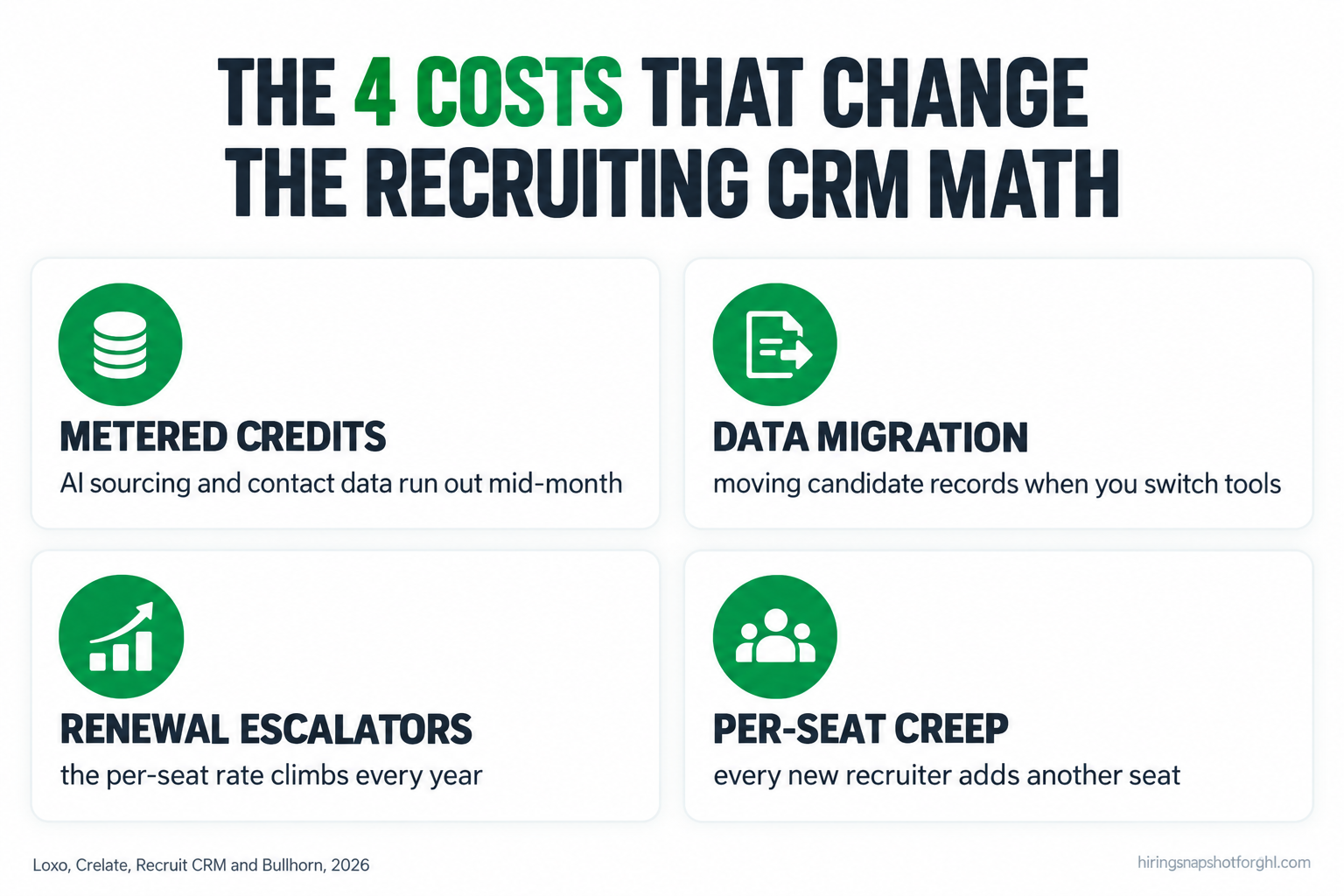
Loxo meters its AI sourcing and contact-data features by credits, with Boost add-ons of 5,000 and 12,500 credits per user per month (Loxo). Recruit CRM builds credits into each tier too, 100 on Pro, 200 on Business and 2,000 on Enterprise per user per month (Recruit CRM). If your desk sources heavily, a cheaper seat with a small credit allowance can cost more than a pricier seat with a big one once you buy the top-ups. Crelate handles data differently: contact enrichment, e-signature and texting are separate add-ons rather than metered credits, which keeps the base seat simple but means the real cost depends on what you switch on. The failure mode is the same across all three: you price the seat, you forget the meter, and the invoice in month four is bigger than the demo implied. Ask for the credit allowance and the overage rate in writing.
Criterion 5: Implementation and migration
Switching CRMs has a cost even when the new license is cheaper, because your candidate and client data has to move. This is where the four separate most.
Crelate offers free migration for Core teams of three or more seats, a genuine saving on a switch. Bullhorn states that implementation is free on its Starter, Core and Pro small-agency tiers (100Hires), though larger deployments are a different conversation. Loxo and Recruit CRM handle onboarding as part of the sales process rather than a published fee, so get the migration scope and any data-mapping charge in writing. The rule holds for all of them: a migration that drags on is weeks of paying for two systems at once, so the switch only pays off if the ongoing saving clears the migration cost inside a year.
Criterion 6: Contracts, escalators and getting your data out
The price you sign is not always the price you keep. Most of these tools bill annually, and annual contracts can carry a renewal escalator that lifts the per-seat rate every year. Third-party trackers have reported CPI-linked annual increases on recruiting CRMs in this category, so a $119 seat can quietly become $127, then $136, at each renewal. Ask for the renewal cap in writing before you sign, not after.
The other lock-in is your data. Your candidate records and placement history are the most valuable asset your agency owns, and a vendor that makes export slow or expensive holds the upper hand at renewal. Before you sign with any of the four, get one answer in writing: if I leave in year two, what does a full data export cost, and in what format do I get my records? A vendor that cannot answer that cleanly is telling you something about renewal day.
Criterion 7: Fit for the staffing model you run
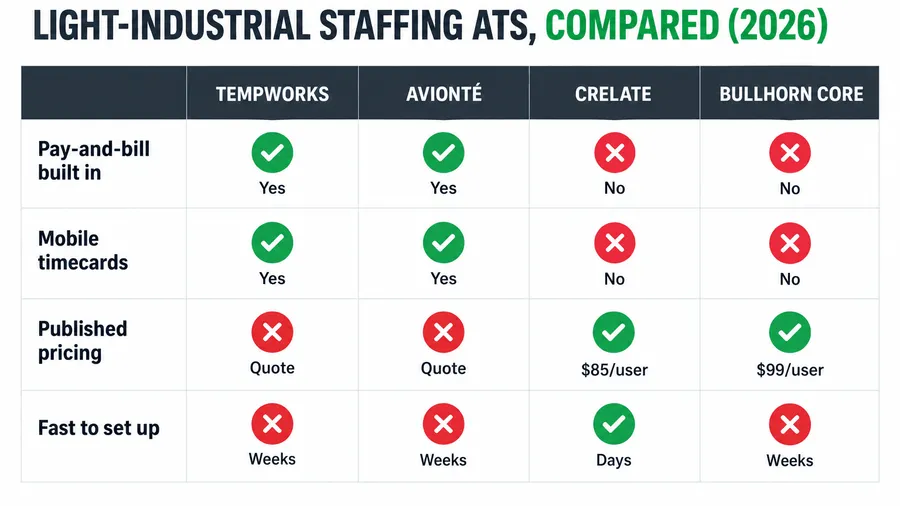
Price is only half the decision. The other half is whether the tool fits how you actually bill. All four of these are front-office tools: applicant tracking and recruiting CRM, built for finding, tracking and placing candidates. None of them is a native pay-and-bill engine that runs weekly payroll and invoices clients off captured hours the way a light-industrial platform does.
That matters most for light-industrial and high-volume temp desks. If you place warehouse, logistics or healthcare temps on a weekly pay cycle, these front-office CRMs track the candidate well and then hand off to a separate back office for pay-and-bill. Loxo and Recruit CRM lean toward sourcing-heavy perm, contract and executive search, where AI sourcing earns its keep. Crelate is a strong generalist across agency recruiting. Bullhorn is the deepest platform and the one most likely to connect to a full back office through its wider suite, part of why it costs what it does. If your desk is genuinely light-industrial, read the best ATS for light-industrial staffing under 20 seats before you pick, because the pay-and-bill question changes the answer.
Criterion 8: Support and the learning curve
The last cost never shows up on an invoice: the time your team loses learning the thing. More power usually means a steeper ramp. Bullhorn is the most capable of the four and also the one small teams most often call heavy to configure and administer, which is fine if you have someone to own it and expensive if you do not. Crelate, Loxo and Recruit CRM all aim at a lighter setup, a real advantage for a small shop without a dedicated admin. When you demo, ask to click around yourself and ask how long a new recruiter takes to get productive, because every week of ramp is a week of a seat you pay for and do not fully use.
Three-year cost for an 8-recruiter desk
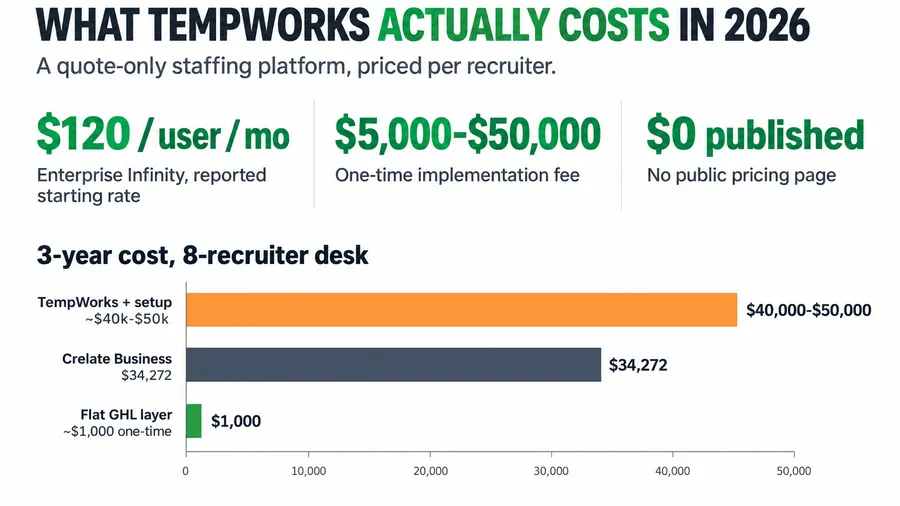
Take an 8-recruiter agency and run the published growing-team tiers over three years, license only, before a single credit pack, add-on or paid module. The spread is wide enough to change which tool you choose.
One caveat keeps this honest. The flat capture layer is a lead-capture and nurture layer, not a full ATS, so an agency that genuinely lives in its tracker all day runs the layer in front of a CRM, not instead of one. The narrow, true point stands: anything priced per seat gets more expensive every time you hire, and on an 8-seat desk the choice between the cheapest and priciest of these four is more than $13,000 over three years before add-ons.
Three scenarios: solo, 8-seat, 25-seat
The right answer changes completely with your size, because the tier models and the credit meters land differently on each.
The solo operator or two-person shop. Start with the free and capped tiers. Loxo’s free single seat is the strongest true zero-dollar option, a real ATS and CRM with sourcing for one recruiter, and Crelate Essentials at $85 covers up to two users cleanly. Recruit CRM Pro at $95 works too and does not cap your contacts the way Essentials does. At this size, do not buy Bullhorn: you will pay for a platform built for teams and use a sliver of it. The bigger win at one or two seats is usually not the CRM at all, it is fixing speed-to-lead, because a solo recruiter cannot answer every applicant in ninety seconds by hand.
The 8-recruiter agency. This is the fairest fight. All four are plausible, and the choice comes down to how you source and how you bill. If you source heavily and lean on AI, Loxo Core at $149 earns its premium, but watch the credit meter. If you want the lowest predictable license, Crelate Business at $119 wins on price, with Recruit CRM Business at $135 close behind and a cleaner public credit ladder. Bullhorn Core at $165 is the pick only if you need its depth and have someone to administer it. Whichever you choose, plan for per-seat creep: every new recruiter adds a seat, so the capture-and-nurture layer is worth moving off per-seat pricing to protect margin.
The 25-recruiter shop. At this size per-seat math is the whole story. Twenty-five seats at $149 is about $44,700 a year on Loxo Core; at $165 it is roughly $49,500 a year on Bullhorn Core, before add-ons, and Bullhorn’s real cost usually sits higher once automation and analytics are switched on, with reported effective rates climbing well past the Core sticker (100Hires). This is where you negotiate hardest on the per-seat rate, the renewal escalator and the credit allowance, and where moving the lead-capture layer off per-seat pricing frees the most margin. The tracker should scale with you; the front-door automation should not cost more every time you grow.
How to run the demos so you do not overpay
You will sit through two to four demos picking between these. Walk into every one with the same list and make the rep put the answers in writing. Steal this verbatim.
The price and tier questions
- “What is the exact per-user, per-month rate for my seat count, billed annually, and which tier does that put me in?”
- “If I add a recruiter mid-contract, what does the next seat cost, and is it prorated?”
- “What is the renewal increase, as a capped percentage, in writing?”
The metered-usage questions
- “How many contact or sourcing credits are included per user per month on this tier?”
- “What does a credit top-up cost when we run out, and how often do desks my size run out?”
- “Which features are metered and which are flat, so I know what can make the bill jump?”
The migration and add-on questions
- “What does it cost to migrate my candidate and client data in, and is it included?”
- “Which of enrichment, e-signature, texting, automation and analytics are extra, and at what price?”
- “What is the go-live timeline, and how long until a new recruiter is productive?”
The exit question
- “If I leave in year two, what does a full data export cost, and in what format do I get my records?”
A rep who will not put the renewal cap, the credit overage and the export terms in writing is telling you where the surprises live. The same muscle that defends your bill rate against a client works on a software rep: know your floor, anchor first, make them justify the premium. I laid that out in defending your markup against rate pushback.
The compliance cost none of them quote you
All four market AI features now, for sourcing, matching or screening, and the moment you switch those on you may be using what some jurisdictions define as an automated employment decision tool. The liability lands on your agency, not the vendor. New York City’s Local Law 144 requires a bias audit of those tools within a year of use, a public summary of the results, and notice to candidates, and the city has enforced it since mid-2023. Colorado’s SB 24-205 adds a risk-management program, impact assessments and notice to the state attorney general, with requirements scheduled to take effect in 2026, so confirm the current status before you rely on a date. The AI sourcing that makes Loxo and Recruit CRM attractive is exactly the feature these rules touch, so get the vendor’s documentation of what its AI does in writing. I covered the full picture in AI hiring laws for staffing agencies in 2026.
Common objections, answered
“Why not just pick the cheapest one and move on?” Because cheapest on the sticker is not cheapest in year two. A $95 seat with a 100-credit allowance can cost more than a $149 seat with a big one, once your sourcing burns through the small pack and you buy top-ups. Price the seat plus the meter plus the add-ons you will actually use. The cheapest total for your usage is the real answer, and it is often not the cheapest sticker.
“We already run Bullhorn. Is it worth switching to save money?” Maybe, if Bullhorn’s loaded cost is well above what you use and a transparent-priced tool covers your real workflow. But a migration has its own cost in time and risk, so the switch only pays off if the ongoing saving clears that inside a year. Price the migration, not just the new license, and read the Bullhorn alternatives rundown before you decide.
“Do I even need a CRM this powerful?” Often, no. Most small desks do not have a tracking problem, they have a speed problem: applicants going cold, slow follow-up, no-shows. That is a capture-and-nurture issue, not a database one. A flat-cost automation layer fixes it for a fraction of a full CRM license and sits in front of whichever tool you run. Buy the deep CRM when you need the deep CRM; fix the front door separately.
“The pricing pages keep changing. How do I trust these numbers?” You verify them on demo day. The figures here come from each vendor’s own pricing page in 2026, but recruiting software reprices often, and Loxo already shifted its tiers this year. Use these numbers to walk in with an anchor, then get your exact quote in writing. The point is not to quote the published rate back as gospel, it is to stop a rep from anchoring you above it.
FAQ
Which is the cheapest recruiting CRM for a small staffing agency in 2026?
For one or two users, Crelate Essentials at $85 per user per month (capped at two users) or Loxo’s free single-seat plan are the cheapest honest options (Crelate, Loxo). For an uncapped growing team, Recruit CRM Pro at $95 per user per month is the lowest published full-CRM price, with Crelate Business at $119 next (Recruit CRM). Cheapest sticker is not always cheapest total once credits and add-ons are counted.
Does Loxo have a free plan?
Yes. Loxo offers a genuine free single-seat plan that includes its ATS, recruiting CRM and Loxo Boost sourcing for one user, not a time-boxed trial. Its paid Core tier starts at $149 per user per month billed annually, and higher tiers meter AI sourcing and contact data by credits (Loxo).
Does Recruit CRM publish its pricing?
Yes, as of 2026 Recruit CRM publishes all three tiers: Pro at $95, Business at $135 (marked most popular) and Enterprise at $215 per user per month, with 100, 200 and 2,000 credits per user per month respectively (Recruit CRM). That is the most complete public price ladder of the four tools compared here.
How much does Bullhorn cost compared to the others?
Bullhorn publishes Starter at $99 and Core at $165 per user per month, then gates Pro and Enterprise behind a demo (100Hires). Core is the priciest published growing-team tier of the four, and Bullhorn’s real cost often rises further once automation and analytics modules are added, so a small desk should price the transparent alternatives before renewing.
Which one is best for a light-industrial temp desk?
All four are front-office recruiting CRMs, not native pay-and-bill platforms, so a light-industrial desk running weekly payroll uses one of them to track candidates and a separate back office to pay and bill. Loxo and Recruit CRM lean toward sourcing-heavy perm and contract, Crelate is a strong generalist, and Bullhorn connects to the deepest wider suite. See the best ATS for light-industrial staffing under 20 seats for the pay-and-bill angle.
Will a recruiting CRM fix candidates going cold?
Not on its own. A CRM stores and tracks the candidate; it does not reply in ninety seconds at 7pm on a Saturday. Speed-to-lead is a capture-and-nurture problem solved by automation that fires instantly on every new applicant. A flat-cost layer handles that in front of whichever CRM you choose, which is how you stop paying per seat to fix a front-door problem.
About the author
Marcus Delgado is the Staffing Agency Growth Lead behind the Hiring Snapshot. He ran a light-industrial staffing desk before joining the team to focus on agency growth, and he thinks in placement economics: fill rates, redeploys, and gross margin per requisition. His posts lean on real desk math, not vanity metrics.
Related reading
- Staffing ATS Pricing in 2026: What Bullhorn, Crelate, Loxo and JobAdder Really Cost
- Bullhorn Alternatives for Small Staffing Agencies: 6 Options and What They Really Cost
- JobAdder Pricing in 2026: What They Won’t Tell You Until You Book the Demo
- The Best ATS for Light-Industrial Staffing Under 20 Seats (2026)
- GoHighLevel vs Bullhorn for Staffing Agencies: An Honest Comparison
Pick the CRM that fits how you source and how you bill, then stop paying per seat to fix the front door. See how the Hiring Snapshot works, then get the full build for a one-time $997, installed within one business day and flat no matter how many recruiters use it.