· Adrienne Boyd · Playbooks · 24 min read
The Staffing Phone Screen Script: Exact Questions to Ask Candidates (and the Ones You Can't)
A loose phone screen is where good orders quietly die. Here is the full six-move phone screen script for staffing recruiters, the exact qualifying and fit questions to ask, the questions EEOC rules say you cannot, and the scorecard that makes every screen repeatable.
It is 10:15 on a Tuesday and you have two phone screens back to back. The first one runs twenty-five minutes, feels friendly, and tells you almost nothing you can submit on. The second one you rush because you are now behind, and you forget to confirm the candidate actually has a car for a shift that starts at 5am across town. Both candidates go into the pipeline. Three days later one no-shows the client interview and the other turns down the role the moment they hear the start time. You did not have a sourcing problem that week. You had a screening problem, and it cost you two orders.
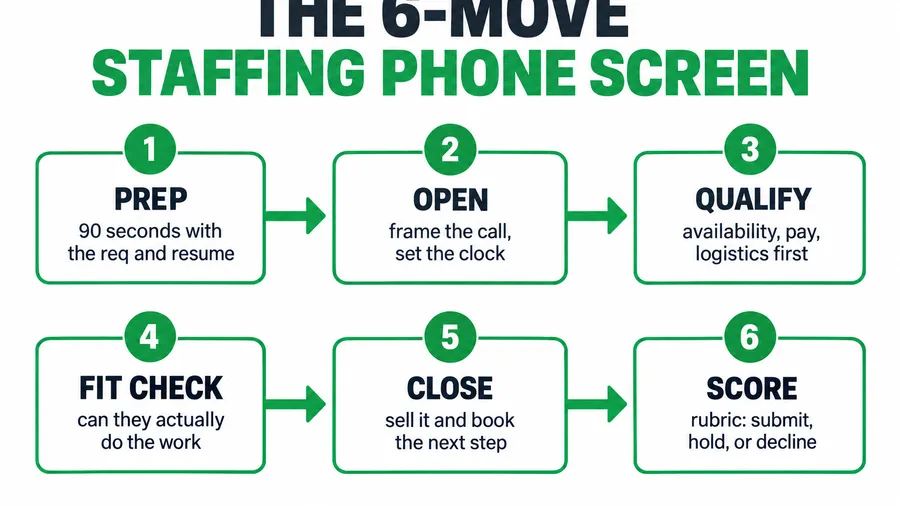
The short answer: a phone screen is not a friendly chat, it is a structured qualify-or-disqualify call that should take eight to twelve minutes and follow the same six moves every time. Prep in ninety seconds, open by framing the call, ask the deal-breaker qualifiers first (availability, pay, logistics), check that they can actually do the work, close by selling and booking the next step, then score the call on a rubric before you touch the next one. Do that and you stop submitting candidates who were never going to start. This is the full script, the exact questions, the ones you are not allowed to ask, and the scorecard that makes it repeatable.
Key takeaways
- Qualify before you build rapport. The deal-breakers (can they start, will the pay work, can they get there) belong in the first three minutes. A warm twenty-five-minute call that ends on an impossible pay rate is twenty-five minutes gone.
- A loose screen is expensive. SHRM’s 2025 benchmark puts average cost per hire at $5,475 for a nonexecutive role, and only 20% of organizations track quality of hire at all, so most desks never see what a bad screen really costs them.
- Some questions are off-limits by law. Before a conditional offer you cannot ask about disability, and you should avoid questions on age, religion, or national origin. There is almost always a compliant version of the question that gets you the same answer.
- Script the call, not the human. A script is a checklist that stops you from forgetting the one question that disqualifies the candidate. It is not a robot voice. You still listen.
- Score every screen. A one-page rubric turns a gut feeling into a submit or decline you can defend to a client and compare across recruiters.
Table of contents
- What a loose phone screen actually costs you
- The phone screen in six moves
- Move 1: The ninety-second prep before you dial
- Move 2: The opening that frames the call
- Move 3: The qualifiers, deal-breakers first
- Move 4: The fit check, can they do the work
- The questions you legally cannot ask
- Move 5: The close that books the next step
- Move 6: Score and log the call
- Three scenarios: solo perm, light-industrial, healthcare
- Common objections, answered
- FAQ
What a loose phone screen actually costs you
There are roughly 27,000 staffing and recruiting companies in the United States running about 54,000 offices, and together they put around 2.2 million temporary and contract workers to work in an average week (American Staffing Association). Every one of those placements starts with a screen, and the screen is where most of the avoidable waste happens, because it is the cheapest point in the whole process to say no and the most expensive point to say yes by accident.
Run the math. The phone screen costs you ten minutes. A candidate who clears a loose screen and gets submitted, interviewed, and placed before anyone notices the problem costs you far more. SHRM’s 2025 benchmarking puts the average cost per hire at $5,475 for a nonexecutive role, and the same report found only 20% of organizations even track quality of hire, which is why most desks feel the pain of a bad screen without ever tracing it back to the call. On the temp side the margin is thin to begin with, average gross margin runs around 25%, so a placement that falls apart in week one does not just cost the fee, it eats the spread on the placements that worked.
The client cost is worse than the dollar cost. Hand a hiring manager a candidate who cannot actually do the job, or who ghosts the interview, and you have taught them to split the next order across two agencies. In the direct-hire world the median time-to-fill already sits around 44 days, and a client who is already waiting does not forgive a wasted interview slot. A tight screen is the cheapest insurance you will ever buy against all of that.
The phone screen in six moves
A good screen is short, boring, and the same every time. That is a feature. The recruiters who screen well are not more charming, they just never forget to ask the question that would have saved them. The call has six moves, in order, and the order matters: you ask the things that can kill the placement before you invest in the things that make it. Do not spend eight minutes bonding over a shared hometown and then discover in minute nine that the candidate needs $3 an hour more than the role pays. Front-load the deal-breakers, and the warmth comes through in how you handle the no, not in how long you talk.
Before you dial, remember that the screen is the back half of a contact chain. The fastest desks have already texted the candidate to confirm interest and basic availability, because SMS gets read and answered in minutes while calls go to voicemail. The phone screen then verifies and goes deeper. And the whole thing only works if you qualified the order first; screening candidates against a req you never pinned down is guessing, so the job-order qualification comes before any of this.
Move 1: The ninety-second prep before you dial
You cannot run a tight screen off a resume you are reading for the first time while the phone rings. Ninety seconds of prep changes the entire call. Pull the req next to the resume and write down the three things this specific order will live or die on: the hard must-haves (a certification, a license, a specific machine), the real pay band the client will approve, and the logistics that actually matter (shift, start date, location, reliable transport). Those three become your disqualifiers, and you ask them first.
Then set the one outcome you want from this call: not “have a nice chat,” but “confirm this person can start the role as written and book them for the next step, or politely close them out.” Write the candidate’s name at the top so you use it, and glance at anything in the resume that needs a direct question, a six-month gap, a job that ended abruptly, a title that does not match the work. You are not interrogating, you are deciding whether to spend the next hour of your day on this person.
How it breaks. Dialing cold and improvising, so you build rapport for ten minutes and never get to the forklift certification that the whole order hinges on. And prepping off the resume alone without the req in front of you, so you screen for a job you are half-remembering and submit a mismatch. The prep is ninety seconds. The mismatch is a wasted interview slot and a client who trusts you a little less.
Move 2: The opening that frames the call
The first thirty seconds set whether this is a focused screen or a rambling catch-up. You want the candidate relaxed but clear that this is a real step with a real role attached, and you want permission to ask direct questions quickly. Say who you are, name the role and why you are calling them specifically, set the time expectation, and get a verbal yes to continue. Setting the clock out loud (“this’ll take about ten minutes”) is what earns you the right to be direct without feeling rude.
One compliance note lives right here: if your next step is to text this candidate reminders and updates, this is a natural moment to confirm they are okay with that, and your consent capture should already have happened when they applied. The TCPA consent rules for recruiting texts are not optional, so do not improvise them on the call; capture consent at the top of the funnel and simply confirm it here.
Steal this: the opening (first 30 seconds)
“Hi [Name], this is [You] with [Agency]. Thanks for applying for the [role] in [area]. I’ve got about ten minutes to run through a few quick questions and make sure it’s the right fit both ways, and if it is, I’ll walk you through what happens next. That work for you right now? … Great. I’ll be direct so we don’t waste your time, and feel free to do the same with me.”
How it breaks. Opening with “so, tell me about yourself,” which hands the candidate the wheel and burns five minutes before you have confirmed a single deal-breaker. And skipping the time frame, so the call has no shape and you feel too rude to cut to the hard questions. Frame it, then drive it.
Move 3: The qualifiers, deal-breakers first
This is the move that saves the most placements, because it is where you find the no before it costs you. Ask the three things from your prep that can kill the order, plainly, in the first few minutes. Availability and start date, pay expectation against the real band, and the logistics specific to this role. If any of them is a hard miss, you have just saved yourself and the candidate the rest of the call, and you close it out kindly. Ask these the same way every time so you can compare candidates honestly instead of on vibes.
For a light-industrial temp order, the logistics are the whole game. For a healthcare or credentialed role, the must-have is usually a license or certification that is pass-fail. Keep your list short and specific to the req, and ask open enough that the candidate volunteers a problem you did not think to ask about.
Steal this: the qualifier block (ask in order, stop at the first hard no)
Availability: “This role starts [date] and runs [schedule]. Are you available to start then, and does that schedule work for you with everything else going on?”
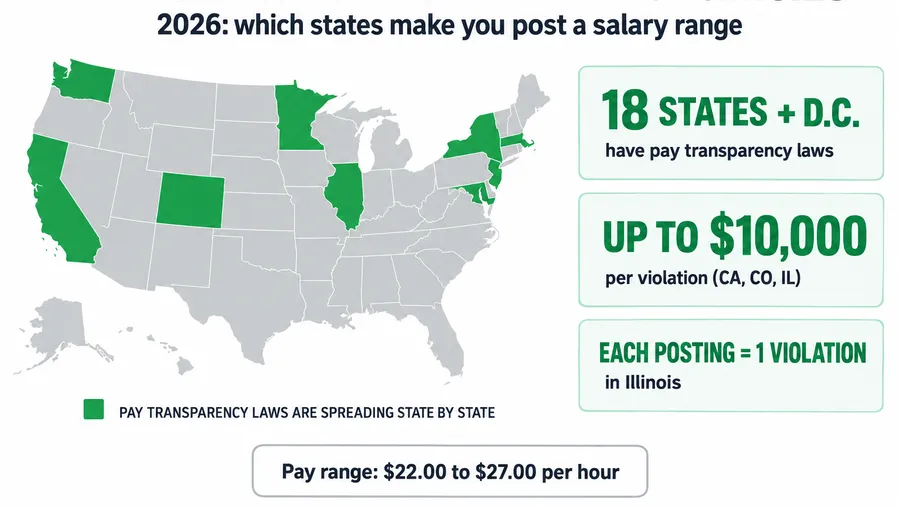
Pay: “The pay on this is [$X/hr]. Is that in the range you’re looking for? I’d rather know now than get you excited about something that doesn’t work.” (Where a salary range is required in your job ad by law, state it; see the pay transparency rules.)
Logistics, light-industrial: “The site is in [area] and the shift is [time]. How would you be getting there, and is that commute something you can do reliably five days a week? Any issue with [standing all shift / steel-toe boots / lifting to 50 lbs] as the role requires?”
Must-have, healthcare or skilled: “This role requires [active RN license in state / CDL Class A / specific cert]. Do you hold that right now, and is it current and unrestricted?”
How it breaks. Saving pay for the end because it feels awkward, so you fall in love with a candidate you cannot afford and have to walk it back. And asking logistics vaguely (“you good to get there?”) instead of concretely, so “yeah, I’ll figure it out” becomes a week-one no-show. Concrete questions get concrete answers.
Move 4: The fit check, can they do the work
Once the deal-breakers clear, you verify the candidate can actually do the job and will show up for it. This is not a full behavioral interview, that is the client’s job. You are checking two things: that the experience on the resume is real and relevant, and that nothing in their recent history predicts a reliability problem. Ask them to walk you through the most relevant thing they have done, in their words, and listen for whether the detail matches the resume. People who did the work can describe it specifically; people who padded a resume get vague fast.
Then ask about the gaps and transitions you flagged in prep, directly and without judgment. “I see the role at [Company] ended in March, what happened there?” is a fair, legal question about work history, and the answer tells you more about reliability than any reference will. Keep it about the work and the job, never about protected characteristics, which is the subject of the next section.
Steal this: the fit questions
- “Walk me through your most recent [relevant role]. What were you actually responsible for day to day?”
- “What’s the piece of this kind of work you’re strongest at, and what’s the part you’d want support on?”
- “I noticed [gap/transition] on your history, can you tell me about that?”
- “Why are you looking to make a move right now?”
- “When you’ve left a role before, how did that usually come about?”
How it breaks. Accepting the resume at face value and never asking them to describe the work, so you find out at the client interview that “managed inventory” meant “swept the stockroom.” And turning the fit check into a stress interview, which makes good candidates walk. You are verifying, not auditioning them.
The questions you legally cannot ask
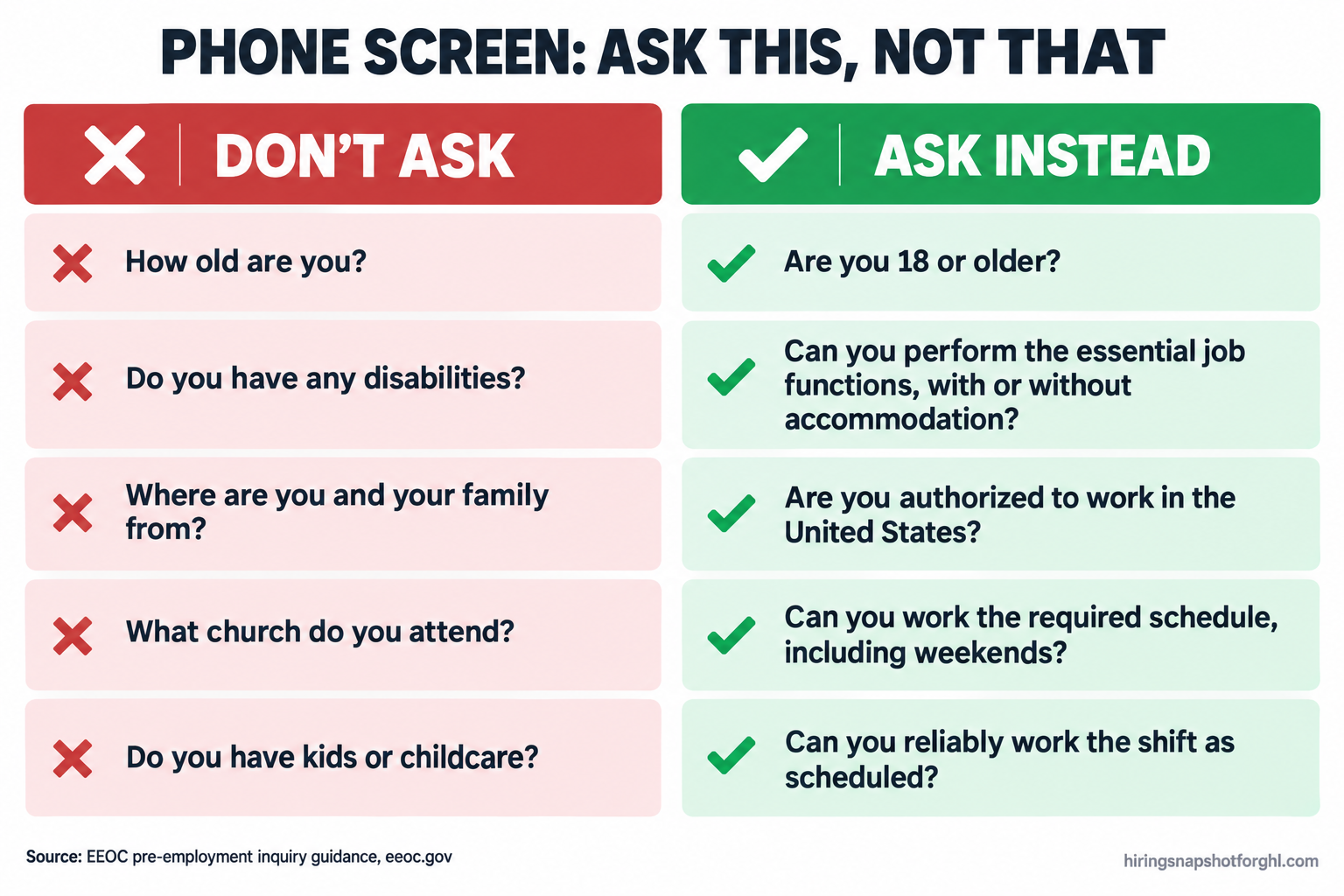
This is where a friendly recruiter gets an agency sued. Federal anti-discrimination law limits what you can ask before a conditional offer, and the limits are strict on disability. The EEOC is explicit: before a conditional job offer, an employer may not ask about the existence, nature, or severity of a disability, and may not require a medical exam. You can ask whether the person can perform the essential functions of the job, with or without reasonable accommodation. After a conditional offer you may ask medical questions, but only if you ask them of everyone entering that same job.
The softer-but-still-dangerous zone is age, religion, national origin, race, and sex. The EEOC treats questions that reveal these as evidence of discrimination rather than an automatic violation, but “evidence against you in a complaint” is reason enough to never ask. That means no questions about an applicant’s religious affiliation, place of worship, or holidays, no asking about age or graduation year, and no questions about where someone or their family is from. The rule of thumb is simple: every question should be about the job and the work, not about the person’s life. The good news is that for almost every forbidden question, there is a legal version that gets you the real answer.
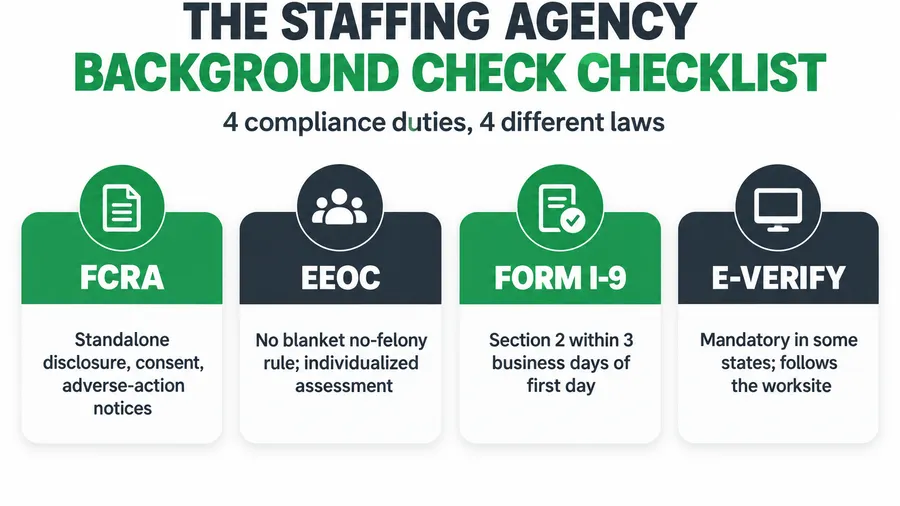
If a background check is part of the role, that is its own regulated step and it happens after the screen, under the Fair Credit Reporting Act, with a standalone written disclosure and the candidate’s authorization, plus a proper adverse-action process if you act on what it finds. The EEOC and FTC spell out the employer rules for background checks, and asking only some applicants about criminal or financial history, based on race or national origin, is itself evidence of discrimination. This is general information, not legal advice, so have counsel confirm your intake. But the principle holds: keep the screen about the work, and you stay both fast and defensible.
Move 5: The close that books the next step
A screen that ends with “okay, we’ll be in touch” is a screen you half-wasted. If the candidate passed, the whole point of the call is to move them to the next step while they are warm and on the phone, not to let them cool off in your pipeline for two days. If they did not pass, you close them out cleanly so they leave with a good impression and stay in your bench for the next role. Either way, you end the call with a clear next action, not a vague promise.
For a pass, sell before you book. Remind them in one sentence why this role fits what they just told you, then put the next step on the calendar then and there, and set the expectation for what happens between now and then. Booking live, on the call, is what turns a good screen into a kept interview, and the reminder cadence after it is what kills the no-show. For a decline, be honest and kind, and keep the door open, because the light-industrial worker you pass on today is often the perfect fit for next week’s order.
Steal this: the close (pass)
“Based on everything you’ve told me, I think you’re a strong fit for this, and I’d like to move you forward. The next step is a [interview/site visit] with [client] on [day]. I’ve got [time] or [time] open, which works better? … Perfect, I’m booking you now. You’ll get a text to confirm and a reminder the day before. Between now and then, if anything changes, you call or text me first, okay? I’m in your corner on this one.”
Steal this: the close (decline)
“I appreciate you taking the time, [Name]. This particular role isn’t the right match on [reason], but you’ve got a solid background and I run roles like [X] regularly. I’m going to keep you active in our system, and I’ll reach out the moment something fits. Keep your phone handy.”
How it breaks. Ending on “we’ll call you,” which means the candidate takes the next offer that does commit to them. And booking the interview but skipping the reminder setup, so the no-show rate stays in the twenties. The close is not the end of the screen, it is the handoff to the next step, and it only works if the handoff is locked before you hang up.
Move 6: Score and log the call
The last move takes sixty seconds and it is the one almost everyone skips. Before you dial the next candidate, score this one while it is fresh. A one-page rubric turns “seemed good” into a decision you can compare across candidates and defend to a client, and it is what lets a desk with three recruiters screen to the same standard instead of three different gut feelings. Score the things that actually predict a placement: did they clear the hard qualifiers, is the relevant experience real, do they read as reliable, and are they genuinely available and interested.
Keep it simple, a yes/no on each must-have and a one-to-five on the judgment calls, plus two lines of notes and a clear verdict: submit, hold, or decline. Then log it where the rest of the order lives, not on a sticky note. When the scorecard sits inside your recruiting pipeline, every submission carries its screen notes, every client can see why you put this person forward, and every recruiter is graded on the same scale.
Steal this: the screen scorecard
- Hard qualifiers (all must be YES to submit): available for the start date and schedule / pay expectation within band / logistics or must-have cert confirmed.
- Relevant experience is real (1-5): could they describe the actual work specifically?
- Reliability signal (1-5): job history, gaps, reason for leaving.
- Interest and responsiveness (1-5): did they engage, answer, and commit to a next step?
- Notes (2 lines): the one thing the client should know, and the one risk to watch.
- Verdict: Submit / Hold / Decline, and why in one sentence.
How it breaks. Trusting memory across a day of ten screens, so by 4pm you cannot remember which candidate had the reliable car. And scoring in your head instead of on paper, which means you cannot compare candidates or show a client your reasoning. The rubric is what makes the screen a system instead of a performance.
Three scenarios: solo perm, light-industrial, healthcare
The six moves are the same at every desk. What you weight, and where the call tends to break, is not.
The solo contingency recruiter, perm placements, 20 to 25% fees. Your screen is longer and heavier on fit, because one placement is a full fee and a bad submittal to a retained client is reputation you cannot afford. Standard contingency fees run 15 to 25%, with 20% the most common, so a single mis-screen is a month’s work gone. Spend more of the call on Move 4, verifying the experience is real and probing motivation and counteroffer risk, because the candidate who ghosts after a verbal yes is your biggest loss. But do not skip the qualifiers; salary expectation against the client’s band is still the fastest disqualifier you have.
The 8-recruiter light-industrial agency, temp and temp-to-hire, 40 to 80% markup. Here the screen is short, high-volume, and logistics-first. Your deal-breakers are almost always in Move 3: can they get to the site, can they do the physical work, can they start on the date. At your volume a twenty-five-minute screen is a luxury you cannot afford and a loose one is a no-show machine, so the win is a tight eight-minute script that every recruiter runs identically, with SMS confirming availability before the call even happens. This is exactly the work a CRM should carry, and the benchmarks worth tracking start with screen-to-submit ratio by recruiter.
The healthcare or credentialed desk. Your screen has a pass-fail gate the others do not: the license or certification, active, current, and unrestricted, confirmed on the call before anything else matters. Everything in Move 3 leads with that, because a warm screen for a nurse whose license lapsed is wasted on both sides. You also lean harder on the compliance line in Move 4 and the FCRA background flow afterward, because credentialed placements carry more regulatory weight. The scorecard matters most here, since you are often screening against a credential checklist a client will audit.
Common objections, answered
“A script makes me sound like a robot.” A script is a checklist, not a teleprompter. The best recruiters sound completely natural and still hit every disqualifier, because the script lives in their head as “the five things I always confirm,” not as words they read aloud. The candidate never hears a script, they hear a recruiter who is organized and respects their time. The robotic screens are the improvised ones that wander, not the structured ones that move.
“I don’t have time to screen every applicant this thoroughly.” This screen is eight to twelve minutes, and it exists precisely because you do not have time to waste. The expensive version is the loose twenty-five-minute call that still submits a mismatch. Front-loading the deal-breakers means most of your declines happen in the first three minutes, so your average call is far shorter than you think, and the long calls are the ones worth having. If volume is the real problem, that is a capture-and-qualify automation problem, not a reason to screen worse.
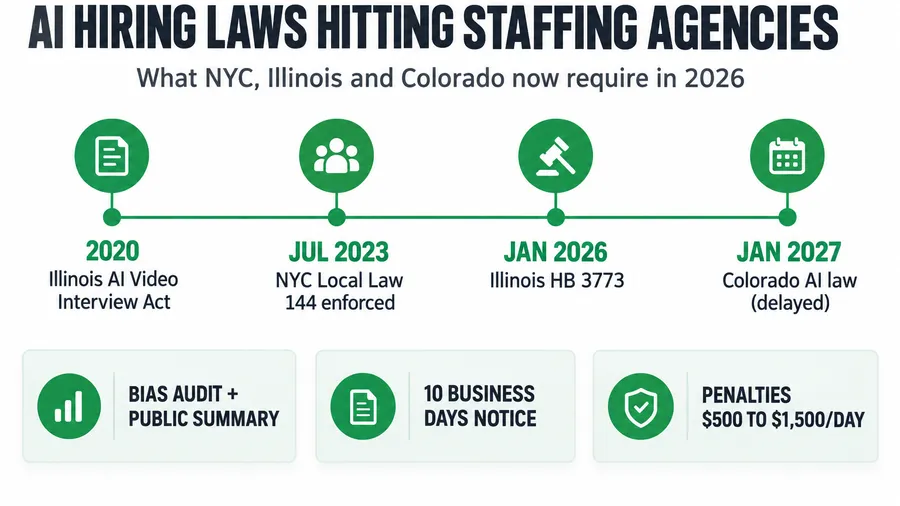
“Can’t AI just handle the screen now?” For first-pass qualification at volume, increasingly yes, and AI phone screening can confirm availability, pay, and basic must-haves 24/7 so your recruiters only talk to candidates who already cleared the gate. But AI handling the first pass does not remove the rules; the same EEOC limits apply to an automated screen, and the human close and judgment call still matter. Use automation to run the qualifiers and book the call, and keep the human for the fit read and the close.
“Won’t disqualifying people early cost me good candidates?” Disqualifying for this role is not rejecting the person. The candidate who cannot do the 5am shift today is in your bench for the day shift next week, which is why the decline script keeps them warm. Early disqualification protects the candidate from a role that would not work for them and protects you from a no-show, and a clean, kind decline is what makes them pick up when you call again. Losing a candidate happens when you waste their time, not when you are honest fast.
FAQ
How long should a recruiter phone screen be?
Eight to twelve minutes for most staffing roles. Long enough to confirm availability, pay, logistics, and that the experience is real, short enough that a busy recruiter actually runs it on every candidate. High-volume light-industrial screens can run shorter because they are logistics-first, while perm and executive screens run longer because fit and motivation carry more weight. If your screens routinely pass twenty minutes, you are probably building rapport before you qualify, which is the most common way a screen wastes time.
What questions should you ask in a staffing phone screen?
Ask the deal-breakers first: availability and start date, pay expectation against the real band, and the logistics or hard must-have the role requires, such as transport, physical requirements, or a license. Then verify the experience is real by asking the candidate to describe their most relevant work, and probe any gaps or abrupt transitions. Finish by selling the next step and booking it on the call. Keep every question about the job and the work, never about the person’s protected characteristics.
What questions are illegal to ask in a phone screen?
Before a conditional job offer you cannot ask about the existence, nature, or severity of a disability, and you cannot require a medical exam, per EEOC guidance. You should also avoid questions that reveal age, religion, national origin, race, sex, or family and childcare situation, because the EEOC treats them as evidence of discrimination. There is almost always a legal version: ask whether the candidate can perform the essential functions with or without reasonable accommodation, whether they are legally authorized to work in the United States, and whether they can work the required schedule.
Should the phone screen come before or after qualifying the job order?
After. Screening a candidate against a req you have not pinned down is guessing, because you do not yet know the real pay band, the true must-haves, or whether the order is even fillable. Qualify the order first, decide what “qualified” means for that specific client, then screen candidates against that standard. Doing it in the other order is how recruiters submit technically-skilled candidates who still fail on something the client never clearly stated.
How do you score a candidate phone screen?
Use a one-page rubric with a yes/no on each hard must-have, a one-to-five on the judgment calls like real experience and reliability signal, two lines of notes, and a clear verdict of submit, hold, or decline. Score it in the sixty seconds right after the call, while it is fresh, and log it where the order lives so every submission carries its reasoning. A rubric is what lets multiple recruiters screen to the same standard and lets you defend a submission to a client.
Can you text a candidate before the phone screen?
Yes, and the fastest desks do, because a text confirming interest and basic availability gets answered in minutes while calls go to voicemail. The catch is consent: under the TCPA you generally need prior express consent before sending automated texts, so capture that consent when the candidate applies, with clear language and an easy opt-out, and keep the record. Done right, an SMS pre-qualify means your phone screen only spends time on candidates who already confirmed the basics.
About the author
Adrienne Boyd is the Recruiting Automation Strategist behind the Hiring Snapshot. She spent a decade building applicant-capture funnels and SMS-first nurture cadences for staffing agencies before moving full-time into GoHighLevel automation. She writes the playbooks and field reports, and she is happiest when a manual, three-person process collapses into a single trigger. This article is general information for staffing operators, not legal advice; confirm your screening and background-check process with qualified counsel.
Related reading
- How to Qualify a Job Order Before You Work It: The Filter That Keeps a Staffing Desk Fillable
- Why Recruiters Lose Candidates in the First 48 Hours (And What to Do About It)
- SMS-First Recruiting: Why Texts Beat Calls for Reaching Candidates
- Cutting Interview No-Show Rate From 22% to 6% (The Cadence That Works)
- AI Phone Screening for Recruiters: How Voice Agents Screen and Book Candidates 24/7