· Adrienne Boyd · Playbooks · 17 min read
How to Use GoHighLevel as an ATS: Build a Recruiting Pipeline That Fills Reqs Faster
You can run a real applicant tracking system inside GoHighLevel — candidates as contacts, requisitions as pipelines, stages that move themselves. Here's the exact build, stage by stage, with the automation that turns a scattered desk into a system.
Yes — you can run a genuine applicant tracking system inside GoHighLevel, and for most staffing and recruiting desks it is enough to replace the spreadsheet, the shared inbox, and the sticky notes. The trick is knowing which GoHighLevel object maps to which ATS concept: a candidate is a Contact, a requisition is a Pipeline, each hiring stage is a Pipeline stage, candidate data lives in custom fields, skills and sources become tags, interviews run on Calendars, and every handoff between stages is a Workflow. Build those seven pieces correctly and you get the one thing a spreadsheet can never give you: a pipeline that moves candidates forward by itself, times every follow-up in seconds, and tells you exactly where each req is stuck. This is the full build — stage by stage — plus the recommended pipeline template and the single setting that makes the whole thing worth doing.
Key takeaways
- GoHighLevel maps cleanly onto ATS concepts. Candidates = Contacts, requisitions = Pipelines, stages = Pipeline stages, candidate data = custom fields, interviews = Calendars, every handoff = a Workflow. No new software, no per-recruiter ATS seat.
- The scattered pipeline is the enemy. Only about 3% of applicants ever reach an interview (CareerPlug 2025, 10M+ applications), and recruiters lose an average of 17.7 hours of admin per vacancy — more than two working days (Totaljobs via People Management, 2025). Structure recovers both.
- Two pipelines, not one. Model candidates and requisitions as separate pipelines so a person can be in play for several jobs without collision.
- Automation is the point. Stage-based workflows fire the first SMS in seconds, book interviews without back-and-forth, and keep candidate records from rotting — B2B contact data decays roughly 22.5% a year if nothing maintains it (HubSpot/MarketingSherpa database-decay research).
- Speed is the setting that pays. Contacting an applicant within five minutes instead of thirty makes you ~21× more likely to qualify them (MIT / Lead Response Management). A GoHighLevel ATS makes five minutes the default, automatically.
Table of contents
- Can GoHighLevel actually work as an ATS?
- Why a staffing desk outgrows the spreadsheet
- The 7 building blocks of a GoHighLevel ATS
- Step-by-step: build the recruiting pipeline
- The recommended recruiting pipeline template
- GoHighLevel ATS vs. a dedicated ATS like Bullhorn
- Speed-to-lead: the setting that makes it worth it
- Common mistakes to avoid
- FAQ
Can GoHighLevel actually work as an ATS?
An applicant tracking system does four jobs: it stores candidate records, moves each candidate through defined hiring stages, automates the communication between those stages, and reports on where everyone is. GoHighLevel does all four natively — it just calls them by CRM names. So the honest answer is: for a staffing or recruiting desk placing anywhere from a handful to a few hundred people a month, GoHighLevel is a completely workable ATS, and often a better one than a dedicated tool, because the same platform also runs your marketing, your SMS, your scheduling, and your billing on one candidate record.
Where a purpose-built enterprise ATS pulls ahead is deep resume parsing, VMS integrations, and job-board syndication at scale — we’ll be fair about that in the GoHighLevel vs. Bullhorn breakdown below. But the reason most desks never switch back after building this is simple: a dedicated ATS tracks candidates; a GoHighLevel ATS tracks candidates and does the work — the texting, the reminders, the re-engagement — on the same record, with no export, no sync, and no second login.
The applicant-tracking market is worth about $17.2 billion in 2025 and growing at roughly 8.2% a year (Fortune Business Insights), which tells you two things: tracking candidates in a structured system is now table stakes, and there’s a lot of budget flowing into tools that do less than what you already own a GoHighLevel account to do.
Why a staffing desk outgrows the spreadsheet
Before the build, it’s worth being precise about what the spreadsheet is actually costing you, because those numbers are what the pipeline is designed to recover.
Candidates leak at every stage. Across more than ten million applications, CareerPlug found that only about 3% of applicants ever reach an interview (CareerPlug 2025 Recruiting Metrics). Some of that is legitimate screening — but a large share is process leakage: applicants who never got a reply, records that fell through a tab, follow-ups nobody remembered to send. A tracked pipeline doesn’t magically qualify unqualified people; it stops you from losing the qualified ones to silence.
Recruiters drown in admin. A 2025 Totaljobs survey of HR leaders found recruiters spend an average of 17.7 hours of administrative work per vacancy — more than two full working days per hire (People Management). Copy-pasting candidate details, chasing availability, re-typing the same status update — that’s the work a pipeline with workflows deletes.
The database rots while you watch. Contact data is not static. The long-standing B2B benchmark, popularized by HubSpot’s database-decay research citing MarketingSherpa, is that contact data decays around 2.1% per month — roughly 22.5% a year (Apollo summary of the research). A recruiting database of 5,000 candidates left untouched loses over a thousand usable records a year. A live pipeline that keeps re-engaging people keeps those records warm instead.
And the front door itself leaks. iCIMS’ 2025 State of Frontline Hiring found that 60% of workers have started a job application and never finished it, with half pointing to forms that are too long (iCIMS 2025). Your intake form is part of your ATS, and a shorter, smarter form is one of the first things this build fixes.
The 7 building blocks of a GoHighLevel ATS
Every ATS feature you’re used to has a GoHighLevel equivalent. Learn this map once and the rest of the build is just configuration.
| ATS concept | GoHighLevel object | What it does for recruiting |
|---|---|---|
| Candidate record | Contact | One record per person: name, phone, email, resume, notes, full activity history |
| Requisition / job | Pipeline (or Opportunity in a job pipeline) | Each open role is its own pipeline; candidates become Opportunities moving through it |
| Hiring stages | Pipeline stages | Applied → Screened → Submitted → Interview → Offer → Placed |
| Candidate data fields | Custom fields | Role type, pay expectation, availability date, work eligibility, certifications, source |
| Skills / source / status | Tags | Filterable labels: forklift-certified, nights, source-indeed, do-not-contact |
| Interview scheduling | Calendars | Self-booking links, round-robin to recruiters, automated reminders |
| Automation between stages | Workflows | First-contact SMS, screening questions, stage moves, reminders, re-engagement |
Two of these do most of the heavy lifting and deserve a note. Contacts are your candidate database — and because a Contact holds unlimited custom fields, you can store everything an ATS would: desired pay, shift preference, distance willing to travel, license numbers, consent timestamps. Pipelines are how you turn that flat database into motion — a candidate isn’t just “in the system,” they’re at a specific, visible stage of a specific req, and that position is what lets automation know what to do next.
Step-by-step: build the recruiting pipeline
Here is the actual build order. Do it in this sequence — each step depends on the one before it.
Step 1 — Decide on a two-pipeline model
The single most important design decision: use two pipelines, not one. A Candidate pipeline tracks a person’s relationship with your agency (New → Vetted → Bench → Placed → Redeployable). A Requisition pipeline — one per open job, or one shared pipeline with an opportunity per candidate-per-req — tracks who is in play for that specific role.
Why separate them? Because in staffing, one candidate is routinely submitted to three clients at once. If you cram everything into a single pipeline, a person can only sit in one stage, and you lose the ability to see “Maria is at Interview for the warehouse req but only Submitted for the forklift req.” Two pipelines keep the person and the placement as distinct objects — which is exactly how a real ATS thinks.
Step 2 — Define your stages
Keep stages few and unambiguous. Every stage should represent a decision point, not a task. A workable requisition pipeline:
- Applied / Sourced — candidate entered for this req
- Screening — qualification in progress (automated questions out)
- Qualified — passed screen, ready to submit
- Submitted to client — client is reviewing
- Interview — client interview scheduled
- Offer — offer extended
- Placed — filled (win)
- Rejected / Fell off — closed-lost, with a reason field
The rule of thumb: if two stages always get the same automation and the same recruiter action, merge them. Fewer, cleaner stages make your reporting honest.
Step 3 — Build the candidate custom fields and intake form
Create the custom fields you’ll actually filter and automate on. At minimum: role/skill category, pay expectation, availability date, work-eligibility flag, shift preference, source, and TCPA consent (with timestamp). Then build the intake form or funnel that populates them.
Keep the applicant-facing form short — remember that 60% start-and-abandon figure and that long forms are the top cause (iCIMS 2025). Ask only what routes the candidate now; collect the rest through automated follow-up questions once they’ve raised their hand. The form’s job is to create the Contact and drop them into the pipeline — not to interview them.
Step 4 — Automate stage movement and speed-to-lead
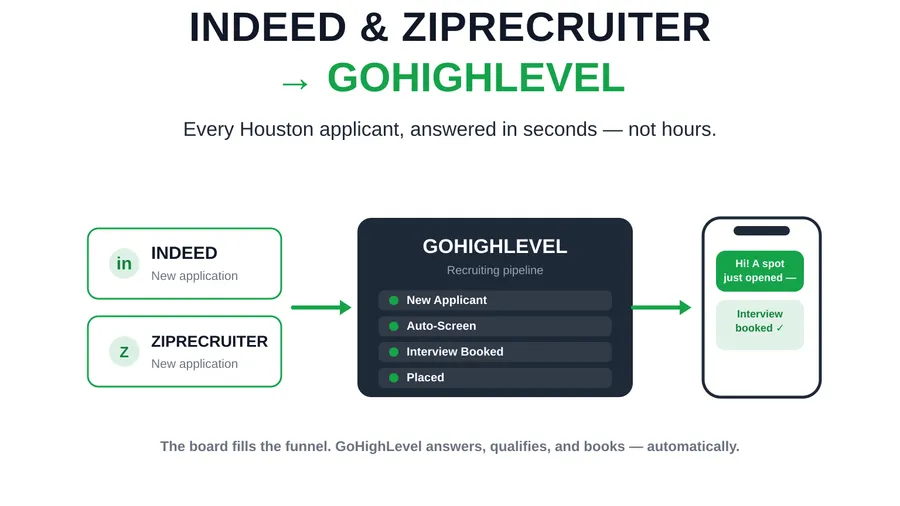
This is where GoHighLevel stops being a spreadsheet. Build a workflow triggered on “Opportunity created / Pipeline stage = Applied” that:
- fires an SMS + email within seconds, confirming receipt and asking the first qualifying question;
- captures the reply and, based on the answer, moves the opportunity to Screening or Qualified automatically;
- creates a recruiter task only when a human decision is actually needed.
That first automated touch is the highest-leverage line of code on the whole desk — the speed-to-lead section below explains why. If you want the fuller screening logic, our guide to AI candidate screening in GoHighLevel shows how Conversation AI can run the qualification conversation end to end, and SMS-first recruiting covers why the first touch should be a text, not an email.
Step 5 — Wire up interview scheduling
Attach a GoHighLevel Calendar to the Interview stage. When an opportunity moves to Interview, the workflow sends a self-booking link (round-robin across recruiters or mapped to the account owner), writes the booking back to the record, and starts a reminder cadence. Interview no-shows are one of the biggest silent drains on a desk; the reminder-plus-recovery pattern in cutting interview no-shows from 22% to 6% plugs straight into this stage.
Step 6 — Bake in compliance
Because this ATS also sends the messages, consent has to live on the record, not in someone’s memory. Capture TCPA consent at intake as a custom field with a timestamp, honor opt-outs at the account level, and keep screening questions job-related and consistent for EEOC fairness. Don’t treat this as paperwork bolted on afterward — it’s a stage-gate. Our TCPA compliance guide for recruiting texts covers exactly what to capture and how to store it so your automation stays fast and defensible.
Step 7 — Report from smart lists and pipeline value
Finally, use GoHighLevel’s opportunity reporting and smart lists as your ATS dashboard: candidates per stage, conversion between stages, average days-in-stage, and source performance. The metric that matters most is days-in-stage — the stage where opportunities pile up is your next automation project. This is the same diagnostic logic behind reducing time-to-fill: find the slowest handoff, automate it, repeat.
That decay curve is also why capture alone isn’t enough. A database you never touch is a depreciating asset; the fix is a standing re-engagement cadence, which is exactly the system in how to reactivate a dead candidate database.
The recommended recruiting pipeline template
Here’s a stage template you can lift directly, with the automation that should fire at each stage and the metric to watch. This is the connective tissue of the whole ATS.
| Stage | Automation that fires | Metric to watch |
|---|---|---|
| Applied | Instant SMS + email; first qualifying question | Speed-to-first-contact (target < 5 min) |
| Screening | Automated Q&A; auto-advance on qualifying reply | Time-in-screening (target same day) |
| Qualified | Recruiter task + client-submission packet drafted | Qualified-to-submit rate |
| Submitted | Client notification; candidate “stay warm” cadence | Submit-to-interview rate |
| Interview | Self-book link + reminder/recovery cadence | Interview show rate (target 90%+) |
| Offer | Offer + e-sign + background/consent checks | Offer acceptance rate |
| Placed | Onboarding kickoff; redeployment date captured | Fill rate / time-to-fill |
| Fell off | Reason logged; drop to bench re-engagement | Closed-lost reasons by stage |
Notice the last row: a candidate who falls off one req doesn’t leave your ATS — they drop to a bench nurture and stay redeployable. That loop is what separates a pipeline from a filing cabinet, and it’s the core idea behind contractor redeployment and the five automations that pay for themselves in 30 days.
GoHighLevel ATS vs. a dedicated ATS like Bullhorn
Being honest about the trade-off is the whole brand, so here it is straight. A GoHighLevel ATS is the right call when you value a single system — candidate tracking plus the actual outreach, scheduling, and billing on one record — and when your volume is in the human-manageable range rather than tens of thousands of monthly applications needing machine parsing.
A dedicated enterprise ATS like Bullhorn pulls ahead on deep resume parsing, native job-board syndication, VMS/MSP integrations, and very high-volume search. If those are core to your desk, weigh it carefully — we lay out the full comparison in GoHighLevel vs. Bullhorn for staffing.
But note what the market data says about how the best firms are pulling ahead: Bullhorn’s GRID research found 78% of firms growing revenue more than 25% use AI tools embedded in their ATS, versus just 51% of firms whose revenue declined (Bullhorn 2026 ATS Usage Report). The winning pattern isn’t “expensive ATS vs. cheap CRM” — it’s automation living inside the system of record. That’s precisely what a GoHighLevel ATS gives a small-to-mid staffing desk without an enterprise price tag.
Speed-to-lead: the setting that makes it worth it
If you build only one automation from this entire guide, build the instant first-contact trigger — because response speed is the master variable of the whole pipeline. The foundational MIT / Lead Response Management study of more than 15,000 leads found that contacting someone within five minutes instead of thirty makes you about 21× more likely to qualify them, and roughly 100× more likely to reach them at all (Lead Response Management).
In staffing, that translates directly: the first recruiter to respond becomes the default choice, because a job-seeker who just applied is talking to three other agencies too. A GoHighLevel ATS makes five-minute response the automatic behavior — the SMS goes out on stage entry whether it’s 9 a.m. Tuesday or 11 p.m. Saturday. That’s a thing a spreadsheet can never do and a thing most desks fail at manually.
The same principle is why the front of the funnel matters more than the offer stage — we take that window apart in why recruiters lose candidates in the first 48 hours, and it’s the reason speed-to-first-contact is the first metric on your ATS dashboard.
Common mistakes to avoid
A few failure patterns show up over and over when desks build this themselves:
- One giant pipeline. Forcing candidates and requisitions into a single pipeline means a person can only be in one stage. Use the two-pipeline model.
- Too many stages. Fifteen micro-stages make your reporting meaningless and your automation brittle. If a stage never changes what happens next, delete it.
- Capturing data you never use. Every custom field you add is a field someone has to fill. Only build fields you’ll filter, automate, or report on.
- Consent as an afterthought. If the SMS goes out before consent is on the record, the whole speed advantage becomes a compliance liability. Gate it at intake — see TCPA compliance for recruiting texts.
- Capture without re-engagement. Building intake but no bench nurture means you rebuild the decaying database every quarter. Add the reactivation cadence from day one.
- Manual first contact. If a human has to send the first text, you’ve already lost the speed-to-lead game most of the time. Automate stage-entry messaging.
Avoid those six and your GoHighLevel ATS will outperform a lot of desks paying five figures a year for dedicated software — because it isn’t just tracking candidates, it’s doing the work.
FAQ
Can you really use GoHighLevel as an applicant tracking system?
Yes. GoHighLevel provides every core ATS function under CRM names: Contacts store candidate records and unlimited custom fields, Pipelines model requisitions and hiring stages, Calendars handle interview scheduling, and Workflows automate the communication between stages. For staffing and recruiting desks placing from a handful to a few hundred people a month, it works as a full ATS — and because it also runs your SMS, email, scheduling, and billing on the same record, it often replaces both the ATS and the outreach stack.
How do you structure a recruiting pipeline in GoHighLevel?
Use two pipelines. A Candidate pipeline tracks each person’s relationship with your agency (New → Vetted → Bench → Placed → Redeployable), and a Requisition pipeline tracks who is in play for a specific job (Applied → Screening → Qualified → Submitted → Interview → Offer → Placed). Separating them lets one candidate be at different stages for several open roles at once, which is how staffing actually works and what a single-pipeline setup can’t represent.
Is GoHighLevel better than Bullhorn for staffing?
It depends on volume and needs. A dedicated ATS like Bullhorn wins on deep resume parsing, job-board syndication, and VMS integrations at very high volume. GoHighLevel wins when you want candidate tracking and the actual outreach, scheduling, and billing on one system without an enterprise price tag. The market signal that matters: 78% of firms growing revenue more than 25% run AI automation embedded in their ATS (Bullhorn 2026), and that automation-in-the-system-of-record advantage is exactly what a GoHighLevel ATS gives a small-to-mid desk. See the full comparison for the trade-offs.
What custom fields should a recruiting pipeline capture?
At minimum: role or skill category, pay expectation, availability date, work-eligibility flag, shift preference, candidate source, and TCPA consent with a timestamp. Only build fields you will actually filter on, automate against, or report from — every field is one more thing that has to be populated, and unused fields make the record noisier without adding signal.
How does a GoHighLevel ATS improve time-to-fill?
By deleting queue time between stages. An automated stage-entry workflow sends the first SMS within seconds instead of hours, auto-advances candidates who answer qualifying questions, sends self-booking interview links, and runs no-show recovery — so days of dead air disappear from the funnel. Since the median time-to-fill is about 44 days (SHRM 2025) and most of it is waiting, not working, automating the handoffs is the fastest way to compress it without adding recruiters.
Do I have to build all of this myself?
No. The Hiring & Staffing GHL Snapshot ships the entire ATS pre-built — the two-pipeline model, candidate custom fields, stage automations, interview scheduling, and TCPA-ready consent capture — configured for a staffing desk and installed on your GoHighLevel account within one business day.
About the author
Adrienne Boyd is a Recruiting Automation Strategist based in Austin, TX, and designs the workflow logic behind the Hiring Snapshot. She spent a decade building applicant-capture funnels and SMS-first nurture cadences for staffing agencies before moving full-time into GoHighLevel automation. She is happiest when a manual, three-person process collapses into a single trigger.
Related reading
- AI Candidate Screening in GoHighLevel: How to Qualify Applicants in Seconds
- GoHighLevel vs. Bullhorn for Staffing: An Honest Comparison
- How to Reduce Time-to-Fill: The GoHighLevel Playbook
- SMS-First Recruiting: Why Email-Only Agencies Are Losing the 2026 Talent Market
- How to Reactivate a Dead Candidate Database: The Re-Engagement Playbook
Want the whole ATS built for you instead of building it stage by stage? See how the snapshot works, book a live walkthrough, or get the full snapshot — installed within one business day.