· Adrienne Boyd · AI & Automation · 16 min read
How to Add an AI Chat Widget to Your Los Angeles Staffing Agency Website (2026 Playbook)
A Los Angeles staffing website gets candidates and hiring managers 24/7 — and most of them leave without saying a word. Here's the step-by-step playbook to add an AI chat widget that captures, qualifies, and books them straight into GoHighLevel, with the real conversion data behind it.
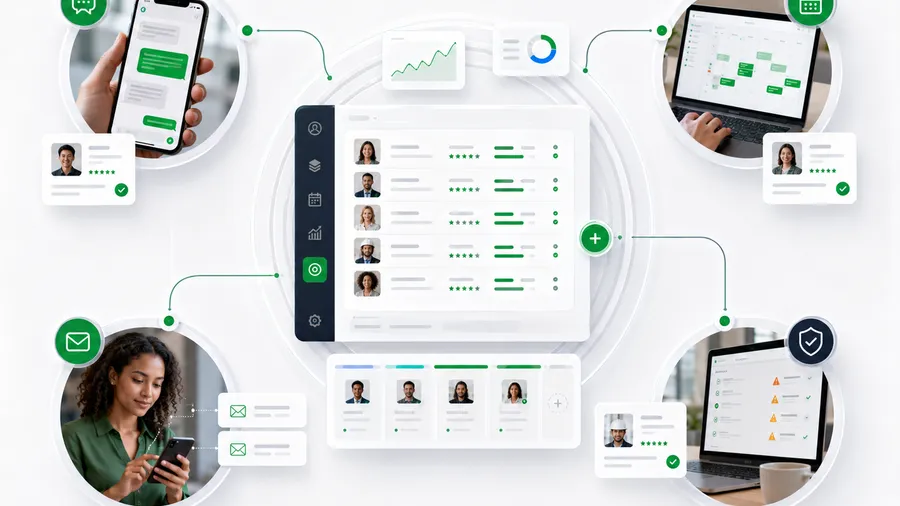
Short answer: add an AI chat widget to your Los Angeles staffing website by wiring a conversational agent into your GoHighLevel account, training it on your real roles and screening questions, and pointing it at your calendar and pipeline — so every candidate and hiring manager who lands on the site at 11 p.m. gets answered, qualified, and booked instead of bouncing. A plain contact form catches the small fraction of visitors willing to fill it out and wait; a chat widget starts the conversation the moment someone hovers, and an AI chat widget finishes it — collecting the role, shift, and contact details, and dropping a booked screen onto a recruiter’s calendar without anyone at your desk lifting a finger. This is the step-by-step playbook, the conversion data behind it, and the honest limits.
Key takeaways
- Chat converts where forms leak. In Comm100’s benchmark data, website visitors who engage in a chat are 2.8x more likely to convert — and visitors proactively invited to chat are 6.3x more likely to become customers (Comm100 Live Chat Benchmark Report 2025).
- Speed is the whole game in recruiting. Contacting a new lead within 5 minutes vs. 30 minutes made firms 21x more likely to qualify it and 100x more likely to connect (Lead Response Management study, Dr. James Oldroyd, MIT / InsideSales). A chat widget answers in seconds — a form answers “whenever someone checks the inbox.”
- Most agencies are slow. The average first response to an inbound web lead was 42 hours, and 23% of companies never responded at all (Harvard Business Review, 2011). A chat widget makes 42 hours into 4 seconds.
- Your candidates are on phones, often after hours. 62% of job applications were submitted on mobile in 2023 — and 86% for hourly and gig roles (Appcast 2024) — the exact visitors a full-screen contact form loses.
- LA is a high-volume, wage-competitive market. The Los Angeles–Long Beach–Anaheim metro employs about 6.3 million people, with office and administrative support the single largest occupational share at 11.2%, at a mean wage of $37.15/hour (U.S. BLS, May 2025) — a lot of shifts to fill and a lot of agencies competing to fill them.
- An AI chat widget is a capture-and-book layer, not a recruiter. It handles the front-door conversation 24/7 so your team spends its hours closing, not chasing form fills.
Table of contents
- Why an LA staffing website needs an AI chat widget
- What an AI chat widget actually is (and isn’t)
- The 7-step playbook to add one
- How it connects to GoHighLevel
- The LA math: what a silent website costs
- Compliance: consent, EEOC, and honesty
- What an AI chat widget won’t do
- FAQ
Why an LA staffing website needs an AI chat widget
Think about who actually lands on a Los Angeles staffing agency’s website. A warehouse worker in Vernon looking for the next shift, thumbing through job pages on their phone at 10 p.m. An operations manager in the City of Industry with four reqs open and a Google tab full of agencies to call in the morning. A CNA in the Valley comparing three healthcare staffing firms before deciding who to trust. Every one of them arrives with intent — and most of them leave without leaving a trace.
That’s the leak. A contact form asks a motivated stranger to stop, type their details into a box, and wait an unknown number of hours for a callback. The data on what happens next is brutal: the average first response to an inbound web lead is 42 hours, and nearly a quarter of companies never respond at all (Harvard Business Review). In recruiting, where the same candidate applied to three other agencies the same afternoon, 42 hours is a placement you already lost.
A chat widget changes the physics. Instead of asking visitors to commit before they’ve gotten anything, it starts talking the moment they show interest. And the conversion gap is real: Comm100’s benchmark report found that visitors who engage in chat are 2.8x more likely to convert, and those proactively invited to chat — the widget popping up with “Looking for work in LA, or looking to hire?” — are 6.3x more likely to become customers (Comm100 Live Chat Benchmark Report 2025).
Now layer in who your visitors are. 62% of job applications came from mobile devices in 2023, rising to 86% for hourly and gig roles (Appcast 2024) — the exact segment a Los Angeles light-industrial or healthcare desk lives on. A multi-field contact form on a phone screen, after hours, is friction stacked on friction. A chat bubble is one tap.
What an AI chat widget actually is (and isn’t)
Let’s be precise, because three different things get called “chat.”
A plain live-chat widget routes messages to a human. Great when someone’s staffing the console — useless at 10 p.m. or when your recruiters are on the phone. An AI chat widget is a conversational agent that sits on your website, greets visitors in your agency’s name, has a natural back-and-forth, understands whether it’s talking to a candidate or a client, qualifies them against your real criteria, and takes an action — captures the details, books a screen, or routes an urgent job order to a recruiter. It runs 24/7, handles many chats at once, and never misses one.
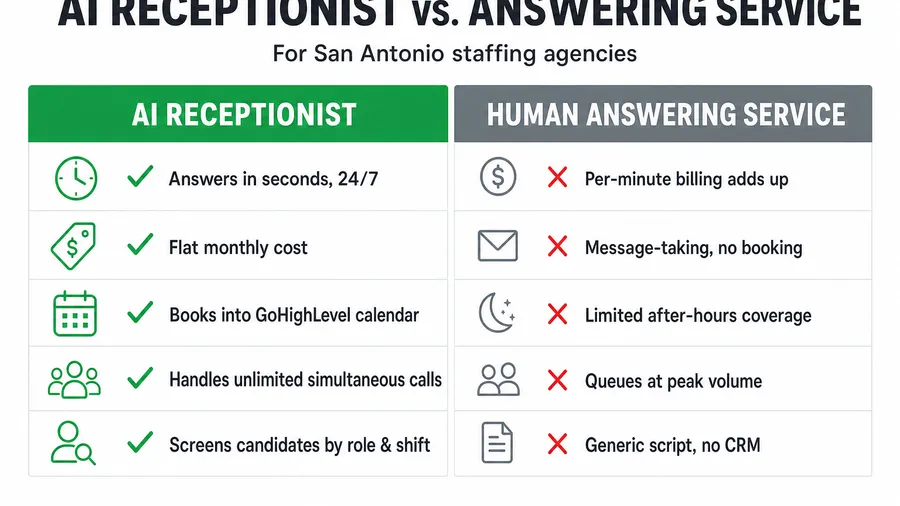
It’s also not the same as an AI receptionist, which does this on your phone line. The two are siblings: the receptionist answers calls, the chat widget answers your website. Most LA desks want both, because candidates and clients split across channels. We cover the voice side in AI receptionist for staffing agencies; this playbook is the web-chat side.
And it’s not a dumb scripted bot with three canned buttons. A modern AI chat agent is trained on your role families (warehouse, forklift-certified, CNA, admin), your pay bands, your shift language, and your screening questions — so the conversation sounds like your best recruiter on their best day, not a decision tree.
The 7-step playbook to add one
Here’s the actual build, in order. You don’t need to rebuild your website — you’re adding a layer to it.
Step 1 — Connect the widget to GoHighLevel. This is the decision that makes the whole thing worth doing. A standalone chatbot that emails you a transcript is a toy; a widget wired into GHL turns every conversation into a tagged contact inside the system you already run your desk on. Start here, not with the bot’s personality.
Step 2 — Define the candidate vs. client fork. Your website serves two audiences with opposite intents. The first question the agent asks — “Are you looking for work, or looking to hire?” — routes everything after it. Candidates go down a qualification path; hiring managers go down a job-order-capture path that can flag “urgent coverage” and ping a recruiter immediately.
Step 3 — Write the qualifying questions. The agent is only as good as the script behind it. For a candidate: role family, shift availability, pay expectations, location/commute, and work authorization. For a client: roles open, headcount, bill rate ballpark, start date, and site. These are your real questions — the ones a recruiter would ask on the phone — not generic filler.
Step 4 — Wire it to your calendar and pipeline. A qualified candidate should be able to book a screen inside the chat, dropping the appointment straight onto a recruiter’s GHL calendar. A captured client should land in your job-order pipeline at the right stage. If the chat ends and nothing moved in GHL, you built a transcript machine, not a capture engine.
Step 5 — Set the compliance guardrails. Recruiting is a regulated conversation. Build TCPA consent capture into the flow before any SMS follow-up fires, and keep the qualifying questions strictly job-related so the agent never touches protected characteristics (EEOC). More on this below.
Step 6 — Add a proactive greeting and a one-tap human handoff. The proactive invite is where the 6.3x lift lives — a well-timed “Need a shift this week, or need to fill one?” beats a silent bubble. And always give visitors an obvious path to a real recruiter; the goal is to serve people, not trap them.
Step 7 — Launch and measure. Track three numbers for 30 days: chats captured, screens booked, and how many of those happened after hours. That after-hours count is pure recovered demand — placements you’d otherwise have slept through.
How it connects to GoHighLevel
The reason this belongs in GoHighLevel rather than a bolt-on chatbot is the handoff. A generic widget collects an email; a widget wired into GHL takes an action the moment the chat ends. The contact exists in your pipeline, tagged by role family, with the screen already on a recruiter’s calendar and the nurture cadence firing — the same capture-qualify-book-nurture engine the Hiring Snapshot runs on, extended to your website.
That connection is also what lets the chat widget work alongside the rest of your stack. It feeds the same applicant pipeline as your job posts and referrals; a trained GoHighLevel VA can work the candidates it captures; and it pairs naturally with SMS-first nurture cadences so a late-night chat becomes a next-morning text. If you want the agent trained deeply on your specific roles and wired to external data, that’s the kind of build we scope as custom GHL development. If your website itself is slow or hard to edit — a common problem with page-builder sites — a fast Astro-built site gives the widget a foundation that ranks; we make the case in Astro vs GoHighLevel websites.
The LA math: what a silent website costs
Put numbers on it. This is illustrative — plug in your own — but the structure is what matters.
Say your Los Angeles website draws 1,500 visitors a month across candidate job pages and your “hire staff” pages. On a form-only site, a typical contact-form conversion is low single digits — call it 2%, or about 30 inquiries. Now add an AI chat widget with a proactive invite. Even applying a conservative version of Comm100’s lift — not the full 6.3x, just a jump to a blended 5% capture across chatting and non-chatting visitors — you’re at about 75 captured conversations, and they arrive qualified and often already booked (Comm100).
That’s ~45 additional captured conversations a month. Assume a conservative slice convert — say 20% become a screen and a third of those a placement — and you’ve recovered roughly 9 extra screens and ~3 extra placements every month from traffic you were already paying to attract. In a wage-competitive market like Los Angeles, where office/admin and light-industrial roles run high volume (U.S. BLS, May 2025), three recovered placements a month is real margin — recovered from visitors who were on your site and about to leave.
The widget doesn’t create demand. It stops you from spilling the demand you’ve already got — the same principle that makes speed-to-lead the highest-leverage fix in recruiting: answering in 5 minutes instead of 30 makes you 21x more likely to qualify a lead (Lead Response Management study). A chat widget answers in five seconds.
Compliance: consent, EEOC, and honesty
Automation that outruns the rules is a liability, not an advantage. Three guardrails matter for an AI chat widget on a staffing site:
- TCPA and consent. If the chat transitions into SMS follow-up, capture proper consent inside the flow before those texts fire — build the opt-in language into the conversation, don’t bolt it on. We walk through the details in TCPA compliance for recruiting texts.
- EEOC and fair screening. The agent should qualify on job-related criteria only — role fit, shift availability, work authorization, pay expectations — never on protected characteristics. Keep the script auditable and identical for every visitor.
- Disclosure and honesty. Tell visitors they’re chatting with an automated assistant, and make reaching a human effortless. Candidates respond well to fast, clear help; they respond badly to feeling tricked.
Get those three right and the chat widget is both faster and more defensible than an inconsistent inbox — every conversation is scripted, consented, and logged.
What an AI chat widget won’t do
We name limits honestly. A chat widget is a capture-and-book layer, not a recruiter. It won’t talk a hesitant candidate into a career move, read the room on a delicate client negotiation, or judge whether a borderline applicant is worth a shot. Those are human calls, and they should stay human.
What it does is make sure your recruiters spend their hours on those calls instead of on the visitors who would have bounced from a form. It handles the volume, the after-hours, the two-at-once — the mechanical front-door work — so your team walks in to a pre-qualified pipeline instead of a quiet website and a stack of missed opportunities. Used that way, it’s a force multiplier on the desk you already have.
Frequently asked questions
What is an AI chat widget for a staffing agency?
It’s a conversational agent that lives on your website and, 24/7, greets visitors in your agency’s name, figures out whether they’re a candidate or a hiring manager, qualifies them against your real criteria (role, shift, pay, location), and takes an action — capturing the details and booking a screen straight into your GoHighLevel calendar. It handles the front-door conversation so your recruiters focus on closing.
How is an AI chat widget different from an AI receptionist?
Same job, different channel. The chat widget answers your website; the AI receptionist answers your phone line. Most staffing desks want both, because candidates and clients split across web and phone. They feed the same GoHighLevel pipeline.
Do I need to rebuild my website to add one?
No. The widget is a layer you add to your existing site — it drops onto your current pages and connects to GoHighLevel behind the scenes. That said, if your site is slow or hard to edit (common with page-builder platforms), a faster foundation helps it rank and convert; see Astro vs GoHighLevel websites for staffing.
Is an AI chat widget compliant with TCPA and EEOC?
It can be, when it’s built correctly. Capture SMS consent inside the chat flow before any texts fire (TCPA), qualify only on job-related criteria and keep the script identical for every visitor (EEOC), and disclose that visitors are chatting with an automated assistant with an easy path to a human. A scripted, logged agent is often more defensible than an inconsistent inbox. See TCPA compliance for recruiting texts.
Will it replace my recruiters?
No. It replaces the bounced website visit, not the recruiter. It handles volume, after-hours, and simultaneous chats — the mechanical capture work — so your team walks into a pre-qualified pipeline instead of a silent site. Human recruiters still do the selling, judgment, and closing.
How much does an AI chat widget cost for a Los Angeles staffing agency?
Our done-for-you AI Web Chat Agent is included in the recruiting social-media package from $397/mo per brand. A fully custom agent — trained on your specific roles, pay bands, and screening scripts and wired to external data — is scoped and quoted individually. The fastest way to a real number is to book a call.
About the author
Adrienne Boyd is the Recruiting Automation Strategist behind the Hiring Snapshot, based in Austin, TX. She spent a decade building applicant-capture funnels and SMS-first nurture cadences for staffing agencies before moving full-time into GoHighLevel automation. She writes the playbooks and field reports, and she is happiest when a manual, three-person process collapses into a single trigger.
Related reading
- AI Receptionist for Staffing Agencies: The Missed-Call Math
- AI Candidate Screening in GoHighLevel: How to Qualify Applicants in Seconds
- SMS-First Recruiting: Why Email-Only Agencies Are Losing the 2026 Talent Market
- Instagram & Facebook Auto-DM Recruiting for Miami Staffing Agencies
- Astro vs GoHighLevel Websites for Dallas Staffing Agencies: Page Speed & SEO Compared
Ready to stop losing Los Angeles candidates and job orders to a silent website? Add an AI Web Chat Agent, scope a custom GHL build, or see how the Hiring Snapshot works.