

Staffing in 2026 isn’t what it used to be. With competition increasing, speed and automation are everything. That’s why GoHighLevel has become the secret weapon for successful staffing agencies.
Whether you’re managing thousands of candidates or running lean with a small team, automation can save you time, reduce errors, and create an unforgettable candidate and client experience.
Let’s break down the top 5 automations every staffing agency must implement in GoHighLevel.
Key Takeaways
- Automate lead capture and follow-up for job seekers and clients.
- Use smart pipelines to track applicants from first touch to placement.
- Engage candidates with SMS, email, and voicemail drops without lifting a finger.
- Speed up onboarding with prebuilt templates and workflows.
- Improve your show-up and placement rates with reminders and nurturing.
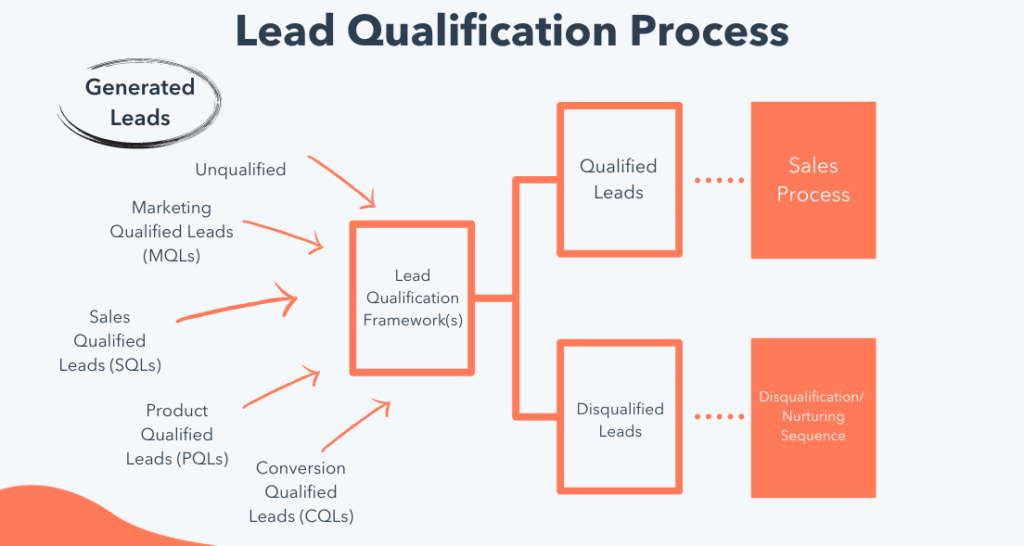
Candidate Lead Capture & Qualification Workflow
What it does: Automatically collects job seekers from ads, job boards, or your website and qualifies them based on role, skills, or location.
📌 How to Set It Up:
- Use a GoHighLevel Form or Survey embedded on your site or landing page.
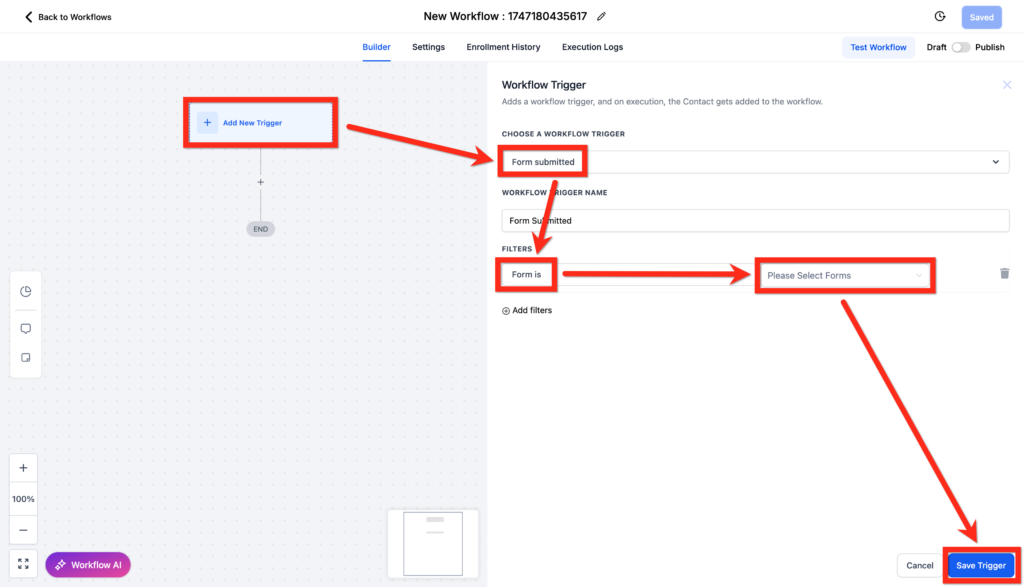
- Trigger a workflow when the form is submitted:
- Add to a pipeline stage like “New Applicant.”
- Send an automated SMS/email confirming receipt.
- Include conditional logic to filter based on role or location.
Example:
A nurse applies through your job board. Based on her ZIP code and license type, she’s instantly routed to the correct recruiter.
Interview Scheduling + Reminders Workflow
Reduce no-shows and wasted recruiter hours.
💡 What to Automate:
- When a candidate is moved to the “Interview Stage,” send a calendar link via SMS/email using GHL Calendars.
- Send 24-hour and 1-hour reminders via text.
- Optionally, send a voicemail drop for a personal touch.
Step-by-Step:
- Add a Workflow Trigger: Pipeline Stage = “Interview.”
- Use “Send Email” + “Send SMS” with Calendly/HL Calendar link
- Add delays and Reminder actions before interview time
Bonus: Use Custom Fields to capture interview feedback.
Client Onboarding & Job Order Collection
Turn client onboarding into a hands-free process.
🔄 Automation Flow:
- Trigger: When a new Client is added or fills out a job order form
- Send: A welcome email with your recruiter contact info and a link to a Job Order form
- Auto-create: Tasks for your internal team to begin the candidate search
- Add client to email nurturing for future roles
Use Case:
New client signs an MSA → Automatically receives job order form → Your team gets notified & workflow kicks off the sourcing process.
Automated Candidate Nurturing Sequences
Not every candidate is ready today. Stay top-of-mind and re-engage.
🔁 Example Sequences:
- Weekly or biweekly check-ins via email or SMS
- Career tips, resume tips, job alerts
- Use “If/Else” branches based on activity (clicked, replied, no response)
How to Build:
- Add applicants to a long-term nurture campaign
- Use GHL’s Email Builder for branded messages
- Tag engaged candidates to bubble them up for hot opportunities
Pro Tip: Add “Job Ready” tags when they click links or reply positively.
Placement + Onboarding Automation
Celebrate wins and ensure smooth transitions.
🛠️ Setup Suggestions:
- Trigger: Pipeline Stage = “Hired” or “Placed”
- Automate:
- Congrats email/SMS
- Onboarding packet or document (use GoHighLevel Documents tool)
- Notify internal team
- Survey for candidate experience (eNPS)
Bonus:
Use the Custom Objects feature to manage placed candidates and upcoming assignments more effectively (available on the $497 SaaS plan).
Frequently Asked Questions
Can I customize workflows for different industries (e.g. healthcare vs. IT)?
Yes! GoHighLevel allows you to clone and tweak workflows per niche using custom fields, tags, and triggers.
How do I avoid sending the same message twice to candidates?
Use Smart Lists + Conditional Triggers to filter contacts by tags or activity.
What if my clients want updates on their job orders?
Create a client-facing pipeline or use email/SMS alerts triggered by pipeline stage updates.
Is GoHighLevel HIPAA compliant for healthcare staffing?
Can I automate document signing for placements?
Final Thoughts
In 2026, staffing is about speed, personalization, and automation—and GoHighLevel gives you the tools to dominate. From capturing leads to onboarding candidates and clients, these 5 automations can save you hundreds of hours and keep your pipeline full.
Start with just one of these workflows and build from there. The best part? Once it’s set up, it works 24/7—so you don’t have to.